 Firefox
 1 / 4
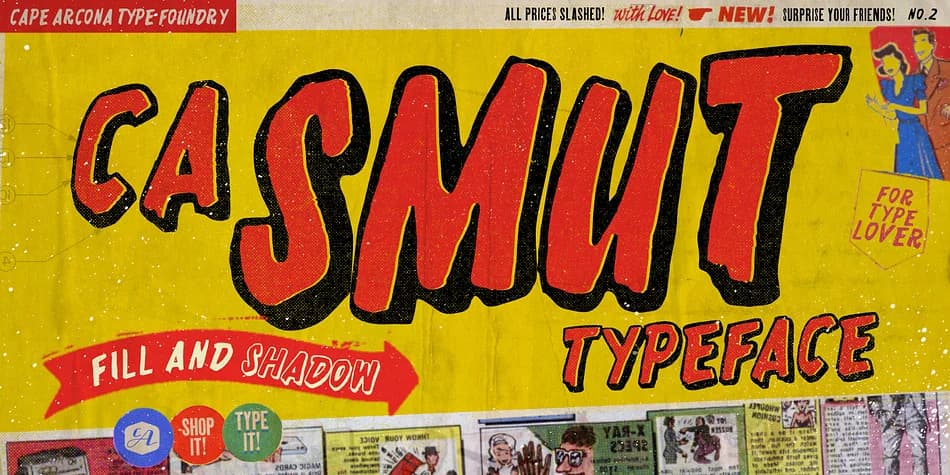
1 / 4About CA SMUT Font
CA Smut by Cape Arcona Type Foundry is a layered decorative typeface with a delightfully rough, hand-stamped character that feels both imperfect and intentional. It arrives as two complementary styles: the Regular weight serves as the shadow foundation, while the Fill version provides the layered body. Stack them together with color variation to create dimensional, hand-printed effects that feel authentic and lived-in, or experiment with offset positioning and altered letter spacing for something more chaotic and unpredictable.
This typeface shines in contexts where texture and raw impact matter most. Horror movie posters benefit from its inherent grit, and it translates exceptionally well to punk and metal band merchandise, theatrical event announcements, and graphic novel covers. The combination of weights also works beautifully for haunted attraction signage, nightlife event flyers, and edgy editorial headlines that need real personality. You can push it further by using the Fill style solo, though keep in mind that the spacing and kerning are calibrated for the Regular version paired underneath, so expect some surprising results when venturing on that path.
Pick up CA Smut on Creative Fabrica and start building your dirtiest designs.
Style & Use Cases
- Overall Style
- Bold, Distinctive
- Use Case
- Headlines, Posters
- Ideal For
- logos, packaging, and standout titles
- Pairs With
- a neutral sans-serif
How to Install CA SMUT Font
Step-by-step instructions for every platform
- 1Download the CA SMUT font file (.ttf or .otf).
- 2Locate the downloaded file in your Downloads folder.
- 3Right-click the font file.
- 4Select "Install" to install for the current user, or "Install for all users" to make it available system-wide.
- 5CA SMUT is now available in Word, Photoshop, Illustrator, and all other apps.
More by Cape Arcona Type Foundry
View all →


Browse fonts by theme
Curated collections →Saw a font in a picture? Identify any font from an image with our free Font Finder.
More Decorative Fonts
Browse all →







What pairs well with CA SMUT Font?
CA SMUT Font is a decorative font that shines as a display or heading face. Pair it with a clean sans-serif or serif font for body text — the contrast creates a clear hierarchy while the two styles stay balanced and easy to read.



CA SMUT Font
Reviewed by the FontBoxDL team · Updated July 2026