 Firefox
 1 / 8
1 / 8About Build Me Halloween Font
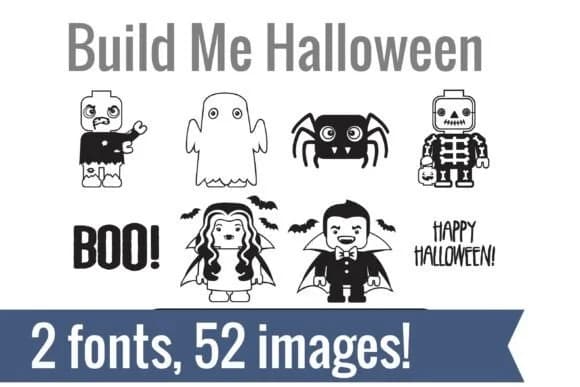
You're designing Halloween decorations with a playful twist, sketching out building-block characters in festive costumes and holiday gear. That's exactly where Build Me Halloween from Illustration Ink delivers. This bundle contains two coordinated dingbat fonts, each loaded with construction toy characters and seasonal icons dressed for Halloween and Thanksgiving celebrations.
Simply type a letter and watch a graphic appear on your canvas, ready to use. Where these fonts shine: vinyl cutting projects for decorative signs and wall art, Halloween party invitations and Thanksgiving placecards, Etsy shop graphics for seasonal sellers, DIY greeting cards, and planner stickers for holiday organization. Each character scales cleanly to any size, maintaining crisp detail whether small or oversized, so you can use them small for card accents or large for cutting projects without any loss of quality. Rather than hunting through clip art libraries or sketching replacements from scratch, you get dozens of ready-to-use designs instantly available through the font installation.
Both fonts work in any design software (Adobe, Procreate, Cricut software, etc.) since they're standard TrueType dingbat fonts that don't require special setup. The construction toy theme carries consistently across both sets so your designs feel cohesive no matter how you combine them. Find both fonts on Creative Fabrica.
Style & Use Cases
- Overall Style
- Iconographic, Halloween
- Use Case
- Icons, Accents
- Ideal For
- ornaments, bullets, and decorative flourishes
- Pairs With
- any text font
How to Install Build Me Halloween Font
Step-by-step instructions for every platform
- 1Download the Build Me Halloween font file (.ttf or .otf).
- 2Locate the downloaded file in your Downloads folder.
- 3Right-click the font file.
- 4Select "Install" to install for the current user, or "Install for all users" to make it available system-wide.
- 5Build Me Halloween is now available in Word, Photoshop, Illustrator, and all other apps.
More by Illustration Ink
View all →



Browse fonts by theme
Curated collections →Saw a font in a picture? Identify any font from an image with our free Font Finder.
More Dingbats Fonts
Browse all →







What pairs well with Build Me Halloween Font?
Build Me Halloween Font is a versatile dingbats font that works for both headings and body text. Pair it with a contrasting sans-serif or serif font to add visual interest and a clear distinction between titles and body copy.



Build Me Halloween Font
Reviewed by the FontBoxDL team · Updated June 2026