
 1 / 8
1 / 8About Bubble Doodle Font
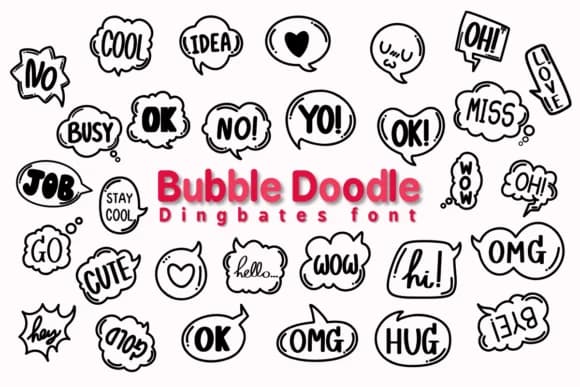
Each character becomes a sketchy speech bubble in Bubble Doodle, a dingbat font by Chonada that opts for hand-drawn charm over machine precision. The outline style gives your work a conversational feel, as if each bubble were sketched by hand with a marker that caught ink at the edges. Rather than standard letterforms, you're working with a collection of chat bubbles, thought clouds, and doodle marks that deliver visual communication on their own. Some have double outlines, others single strokes, creating visual rhythm when you need variety within a message.
The font's sketch-like quality opens real possibilities across project types. Comic strip dialogue, chat interface mockups, and illustrated brainstorming diagrams all gain authenticity from this loose letterform approach. Craft designers find it useful for wood signs and vinyl decals aimed at a playful audience. DIY merchandise labels, children's book callouts, and handmade product tags for small sellers on Etsy benefit from that doodle-forward aesthetic. The outline rendering holds up at any size, from tiny sticker designs to large storefront signage.
This font suits designers who need personality without pretense, work that speaks to humor and hand-drawn sensibility. Find Bubble Doodle on Creative Fabrica when you're ready to give your projects that conversational edge.
Style & Use Cases
- Overall Style
- Iconographic, Bubble
- Use Case
- Icons, Accents
- Ideal For
- ornaments, bullets, and decorative flourishes
- Pairs With
- any text font
How to Install Bubble Doodle Font
Step-by-step instructions for every platform
- 1Download the Bubble Doodle font file (.ttf or .otf).
- 2Locate the downloaded file in your Downloads folder.
- 3Right-click the font file.
- 4Select "Install" to install for the current user, or "Install for all users" to make it available system-wide.
- 5Bubble Doodle is now available in Word, Photoshop, Illustrator, and all other apps.




Browse fonts by theme
Curated collections →Saw a font in a picture? Identify any font from an image with our free Font Finder.
More Dingbats Fonts
Browse all →







What pairs well with Bubble Doodle Font?
Bubble Doodle Font is a versatile dingbats font that works for both headings and body text. Pair it with a contrasting sans-serif or serif font to add visual interest and a clear distinction between titles and body copy.



Bubble Doodle Font
by Chonada
Reviewed by the FontBoxDL team · Updated July 2026