 Firefox
 1 / 8
1 / 8Loading font…
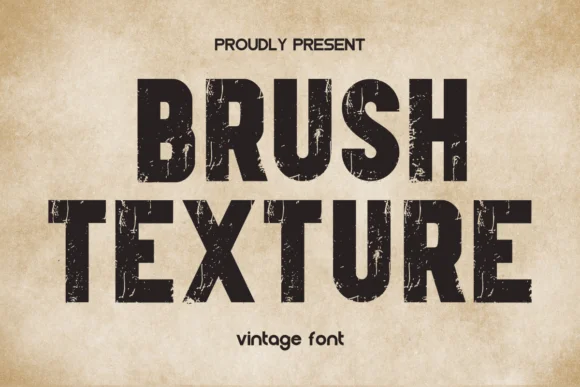
About Brush Texture Font
Brush Texture by Eystore is a slab-serif font that brings a grounded, retro sensibility to any composition. Its hefty character widths and broad serifs cut through visual noise, making it a natural choice for designs that need to command attention without feeling slick or overdesigned. The typeface excels at vintage band tee designs, indie book covers, and boutique product labeling where that tactile, handmade quality actually matters to the audience. It works equally well for poster designs, packaging work, and DIY apparel graphics where you want something that feels genuine and rooted in character rather than slipping into generic trends.
The font carries a hand-brushed aesthetic that suggests real texture beneath the letterforms, even on screen. That quality makes it particularly strong for projects channeling a vintage or artisanal angle. Craft event signage, hand-stamped-looking labels, and heritage brand identities all benefit from the credibility this typeface brings. The wide character set supports the kind of varied typographic treatments that let you play with letter spacing and sizing for extra visual punch when headlines need to land hard.
If you're building something that needs to feel solid, considered, and weathered rather than polished, find Brush Texture on Creative Fabrica and put it to work in your next project.
Style & Use Cases
- Overall Style
- Sturdy, Confident, Vintage Font
- Use Case
- Headlines, Merch
- Ideal For
- vintage posters, logos, and product packaging
- Pairs With
- a light sans-serif
How to Install Brush Texture Font
Step-by-step instructions for every platform
- 1Download the Brush Texture font file (.ttf or .otf).
- 2Locate the downloaded file in your Downloads folder.
- 3Right-click the font file.
- 4Select "Install" to install for the current user, or "Install for all users" to make it available system-wide.
- 5Brush Texture is now available in Word, Photoshop, Illustrator, and all other apps.
More by Eystore
View all →
Browse fonts by theme
Curated collections →Saw a font in a picture? Identify any font from an image with our free Font Finder.
More Slab Serif Fonts
Browse all →







What pairs well with Brush Texture Font?
Brush Texture Font is a slab serif font that shines as a display or heading face. Pair it with a clean sans-serif or serif font for body text — the contrast creates a clear hierarchy while the two styles stay balanced and easy to read.




Brush Texture Font
by Eystore
Reviewed by the FontBoxDL team · Updated October 2026