 Firefox
 1 / 2
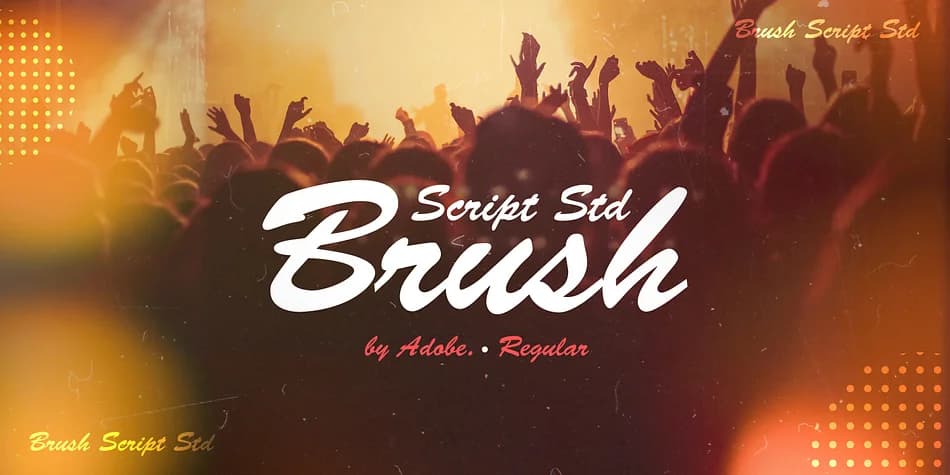
1 / 2About Brush Script Std Font
This typeface captures the casual energy of brush lettering in your hand. Brush Script Std was designed by Robert E. Smith for American Type Founders back in 1942, bringing that same spontaneity to modern typography. The lowercase letters connect to each other exactly as they would in natural handwriting, giving the whole face an informal, unforced quality that printed scripts can never quite replicate.
Real power shows up when you need personality and warmth in your work. Wedding invitation suites benefit from that handwritten feel without looking stiff. DIY craft labels gain the authenticity they need. Boutique restaurant menus and cafe signage find that balance between casual and intentional, drawing attention through character rather than aggression. Etsy product packaging also fits naturally here, where that personal touch matters most. Because this was built for display and headlines, it holds its ground even at smaller sizes.
Connected letterforms create the effect of a single gesture rather than individual characters assembled together. That quality matters when you're asking typography to do emotional work, which script fonts do best. Pair it with a clean, minimal sans-serif for body copy or supporting text, and you'll get the contrast that makes both fonts shine. Grab Brush Script Std from Creative Fabrica and start adding that hand-drawn charm to your designs.
Style & Use Cases
- Overall Style
- Elegant, Flowing
- Use Case
- Invitations, Branding
- Ideal For
- wedding stationery, greeting cards, and signatures
- Pairs With
- a simple uppercase sans
How to Install Brush Script Std Font
Step-by-step instructions for every platform
- 1Download the Brush Script Std font file (.ttf or .otf).
- 2Locate the downloaded file in your Downloads folder.
- 3Right-click the font file.
- 4Select "Install" to install for the current user, or "Install for all users" to make it available system-wide.
- 5Brush Script Std is now available in Word, Photoshop, Illustrator, and all other apps.

Browse fonts by theme
Curated collections →Saw a font in a picture? Identify any font from an image with our free Font Finder.
More Script Handwritten Fonts
Browse all →







What pairs well with Brush Script Std Font?
Brush Script Std Font is a script font that shines as a display or heading face. Pair it with a clean sans-serif or serif font for body text — the contrast creates a clear hierarchy while the two styles stay balanced and easy to read.



Brush Script Std Font
by Adobe
Reviewed by the FontBoxDL team · Updated July 2026