
 1 / 6
1 / 6About Brush on Font
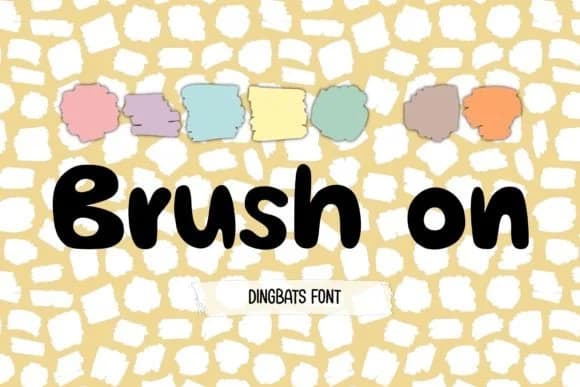
Brush on, designed by DREAMs Soul G., is a playful dingbats collection built on loose, organic brushstrokes that feel hand-drawn rather than templated. The characters dance with energy and personality, making them ideal when you need marks that break away from rigid geometry.
These symbols work beautifully in custom sticker sheets for indie makers, hand-lettered greeting card suites, vinyl decal designs, and children's coloring page templates. The brushy aesthetic also suits packaging for small-batch brands like boutique candle labels, craft supply boxes, and skincare jar stickers, where a sketch-like feel signals handmade care and personality. You can layer these marks over photography, integrate them into scrapbooking layouts, or use them as decorative elements in DIY signage and merchandise graphics. Both OTF and TTF formats are included, so compatibility spans Procreate, Affinity Designer, and Affinity Photo without format friction.
This font belongs in the hands of designers, crafters, and small business owners who want character work that feels personal and a little tongue-in-cheek. Custom merchandise and playful brand assets both benefit from the handmade warmth Brush on delivers, a quality most digital tools struggle to match. Find it on Creative Fabrica and integrate it into your next project or brand asset.
Style & Use Cases
- Overall Style
- Iconographic, Fonts
- Use Case
- Icons, Accents
- Ideal For
- ornaments, bullets, and decorative flourishes
- Pairs With
- any text font
How to Install Brush on Font
Step-by-step instructions for every platform
- 1Download the Brush on font file (.ttf or .otf).
- 2Locate the downloaded file in your Downloads folder.
- 3Right-click the font file.
- 4Select "Install" to install for the current user, or "Install for all users" to make it available system-wide.
- 5Brush on is now available in Word, Photoshop, Illustrator, and all other apps.
More by DREAMs Soul G.
View all →
Browse fonts by theme
Curated collections →Saw a font in a picture? Identify any font from an image with our free Font Finder.
More Dingbats Fonts
Browse all →







What pairs well with Brush on Font?
Brush on Font is a versatile dingbats font that works for both headings and body text. Pair it with a contrasting sans-serif or serif font to add visual interest and a clear distinction between titles and body copy.



Brush on Font
Reviewed by the FontBoxDL team · Updated August 2026