 Firefox
 1 / 7
1 / 7About Bruce Borders Font
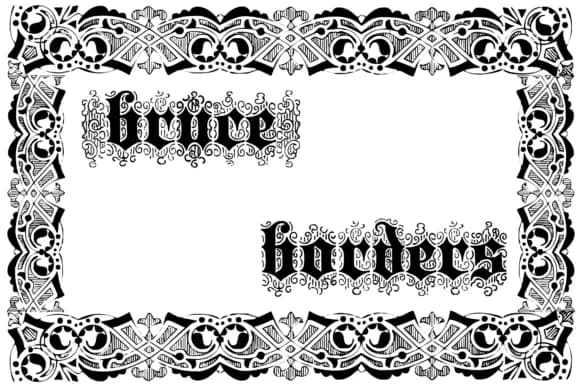
Picture yourself laying out a wedding invitation suite with genuine period flair, or designing a vintage cosmetics label. Bruce Borders by Intellecta Design offers two ornamental border fonts drawn from the original Bruce and Sons 1800s catalog. The pair brings classical decorative language into contemporary work while staying readable at all sizes.
These borders work beautifully for book chapter dividers, vintage product packaging labels, wedding stationery suites, and scrapbook layouts where historical authenticity adds real value. Each border feels proportioned for genuine design work rather than decoration for its own sake. You get multiple weights and ornamental variations, so you can layer borders, swap elements, or build intricate frames depending on what your layout calls for. Apply them to menu design, certificate layouts, decorative gift labels, and DIY craft signage. Once you start exploring what the character set offers, the applications just keep expanding.
The borders work cleanly at large sizes without losing the intricate detail of their original source material. The dual-font approach gives you flexibility to build layered compositions or use one weight standalone. Grab this on Creative Fabrica and bring 19th-century printing house sensibility into your contemporary work.
Style & Use Cases
- Overall Style
- Iconographic, Bruce And Sons
- Use Case
- Icons, Accents
- Ideal For
- ornaments, bullets, and decorative flourishes
- Pairs With
- any text font
How to Install Bruce Borders Font
Step-by-step instructions for every platform
- 1Download the Bruce Borders font file (.ttf or .otf).
- 2Locate the downloaded file in your Downloads folder.
- 3Right-click the font file.
- 4Select "Install" to install for the current user, or "Install for all users" to make it available system-wide.
- 5Bruce Borders is now available in Word, Photoshop, Illustrator, and all other apps.
More by Intellecta Design
View all →
Browse fonts by theme
Curated collections →Saw a font in a picture? Identify any font from an image with our free Font Finder.
More Dingbats Fonts
Browse all →







What pairs well with Bruce Borders Font?
Bruce Borders Font is a versatile dingbats font that works for both headings and body text. Pair it with a contrasting sans-serif or serif font to add visual interest and a clear distinction between titles and body copy.



Bruce Borders Font
Reviewed by the FontBoxDL team · Updated June 2026