
 1 / 8
1 / 8About Bread Font
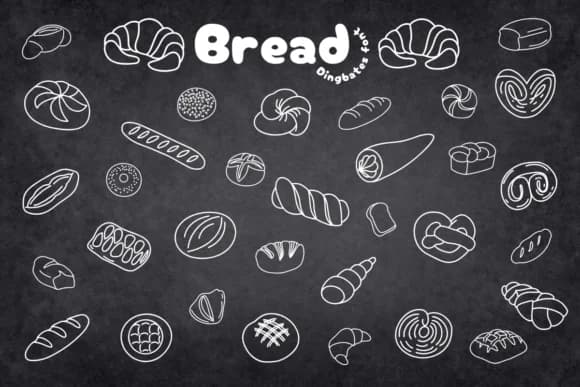
Bread by Chonada is a dingbat collection of hand-drawn bread and bakery icons that brings playful, illustrated charm to food-related projects. The set features everything from baguettes and croissants to loaves, buns, pastries, and grain shapes, all rendered with clean vector lines and a homemade quality that feels inviting rather than over-designed.
This font works especially well for bakery menus, pastry shop branding, recipe cards, and artisanal bread packaging. Since it's a collection of icons rather than letterforms, you can mix and match individual glyphs to build custom compositions without needing extra design software. Food bloggers and small bakery owners use these glyphs to add visual personality to their work without buying separate illustration tools. The range is broad enough that you can find exactly what you need, whether you're adding a single accent or building out a complete visual system.
The wheat-forward imagery suits boutique packaging labels, DIY craft signs for farmers market stalls, and rustic event invitations. If you're creating assets for a sourdough startup or designing Etsy shop graphics with a bakery theme, these shapes give you concrete building blocks instead of generic clip art. Bread is available on Creative Fabrica whenever you're ready to bring bakery charm to your next project.
Style & Use Cases
- Overall Style
- Iconographic, Bakery
- Use Case
- Icons, Accents
- Ideal For
- ornaments, bullets, and decorative flourishes
- Pairs With
- any text font
How to Install Bread Font
Step-by-step instructions for every platform
- 1Download the Bread font file (.ttf or .otf).
- 2Locate the downloaded file in your Downloads folder.
- 3Right-click the font file.
- 4Select "Install" to install for the current user, or "Install for all users" to make it available system-wide.
- 5Bread is now available in Word, Photoshop, Illustrator, and all other apps.




Browse fonts by theme
Curated collections →Saw a font in a picture? Identify any font from an image with our free Font Finder.
More Dingbats Fonts
Browse all →







What pairs well with Bread Font?
Bread Font is a versatile dingbats font that works for both headings and body text. Pair it with a contrasting sans-serif or serif font to add visual interest and a clear distinction between titles and body copy.



Bread Font
by Chonada
Reviewed by the FontBoxDL team · Updated July 2026