 Firefox
 1 / 8
1 / 8About Boho Love Font
You're laying out a set of Valentine's Day cards and realize you need boho-style graphics that actually work inside your cutting software without fussing with imports and layers. Boho Love, from Illustration Ink, is a pair of dingbat fonts designed to solve that friction point. Install the fonts, type a letter, and you get a finished design.
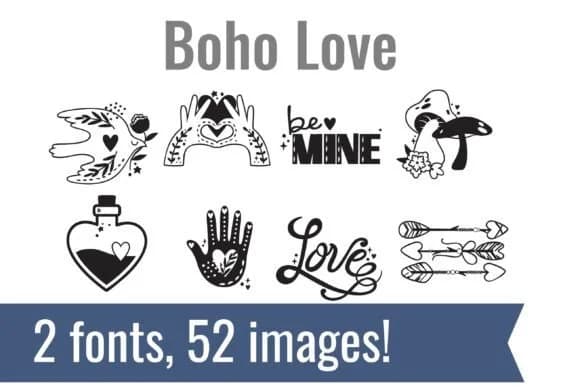
The bundle includes two coordinated fonts filled with hand-drawn hearts, florals, ornamental flourishes, and bohemian elements. You'll use them for vinyl cutting projects, romantic greeting card suites, planner bullet pages, and craft-friendly journaling spreads. Each glyph stays crisp whether you're using it as a small accent or scaling it to fill a page, and the designs are equally legible at size 12 or size 120. Having a unified visual language across both fonts means your projects read as intentional and cohesive instead of mixing random graphics from different sources.
This approach is practical for anyone building handmade Valentine's product lines, designing personal stationery sets, or creating gifts that feel thoughtfully coordinated. Since the designs live as a font file, you can cut, print, and sketch them directly from your software without any extra steps. Pick up Boho Love on Creative Fabrica to add it to your design toolkit.
Style & Use Cases
- Overall Style
- Iconographic, Valentine
- Use Case
- Icons, Accents
- Ideal For
- ornaments, bullets, and decorative flourishes
- Pairs With
- any text font
How to Install Boho Love Font
Step-by-step instructions for every platform
- 1Download the Boho Love font file (.ttf or .otf).
- 2Locate the downloaded file in your Downloads folder.
- 3Right-click the font file.
- 4Select "Install" to install for the current user, or "Install for all users" to make it available system-wide.
- 5Boho Love is now available in Word, Photoshop, Illustrator, and all other apps.
More by Illustration Ink
View all →



Browse fonts by theme
Curated collections →Saw a font in a picture? Identify any font from an image with our free Font Finder.
More Dingbats Fonts
Browse all →







What pairs well with Boho Love Font?
Boho Love Font is a versatile dingbats font that works for both headings and body text. Pair it with a contrasting sans-serif or serif font to add visual interest and a clear distinction between titles and body copy.



Boho Love Font
Reviewed by the FontBoxDL team · Updated June 2026