 Firefox
 1 / 4
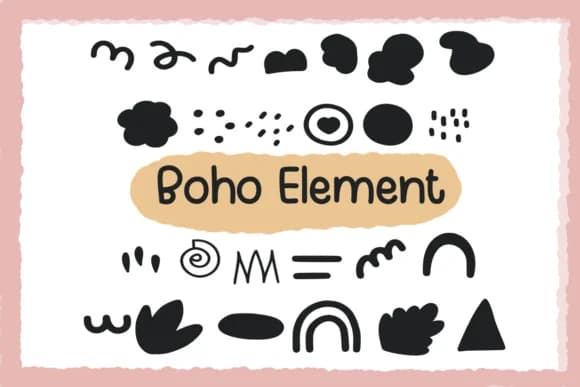
1 / 4About Boho Element Font
Boho Element by Foam-Design Store is a hand-drawn dingbats font that brings organic, decorative marks to layouts with genuine character and warmth. This collection works particularly well for planner spreads where you're breaking up month views with thoughtful visual elements, or bullet journal pages that need hand-drawn flourishes to reinforce that personal, handcrafted feeling. Wedding invitation suites gain depth from the boho aesthetic, as do custom scrapbooking layouts, DIY greeting cards, and art journaling pieces that layer decorative symbols without overwhelming the core content you're trying to highlight.
Beyond paper and stationery applications, these hand-drawn marks carry real weight in product labeling and packaging design work. Vintage-inspired skincare packaging, boutique candle labels, handmade goods branding on Etsy storefronts, and small-batch product photography all benefit when you layer in details that feel intentional and deliberate rather than templated or mass-produced looking. These marks read as authentic, signaling to customers that real care and attention went into every visual choice. With plenty of ornamental marks to choose from in this font, you can mix and match across different projects without any obvious repetition or creating heavy-handed duplication. Get the font on Creative Fabrica and start layering these details into your next design project.
Style & Use Cases
- Overall Style
- Iconographic, Boho Element Font Dingbat
- Use Case
- Icons, Accents
- Ideal For
- ornaments, bullets, and decorative flourishes
- Pairs With
- any text font
How to Install Boho Element Font
Step-by-step instructions for every platform
- 1Download the Boho Element font file (.ttf or .otf).
- 2Locate the downloaded file in your Downloads folder.
- 3Right-click the font file.
- 4Select "Install" to install for the current user, or "Install for all users" to make it available system-wide.
- 5Boho Element is now available in Word, Photoshop, Illustrator, and all other apps.
More by Foam-Design Store
View all →

Browse fonts by theme
Curated collections →Saw a font in a picture? Identify any font from an image with our free Font Finder.
More Dingbats Fonts
Browse all →







What pairs well with Boho Element Font?
Boho Element Font is a versatile dingbats font that works for both headings and body text. Pair it with a contrasting sans-serif or serif font to add visual interest and a clear distinction between titles and body copy.



Boho Element Font
Reviewed by the FontBoxDL team · Updated August 2026