 Firefox
 1 / 4
1 / 4About Blumes Font
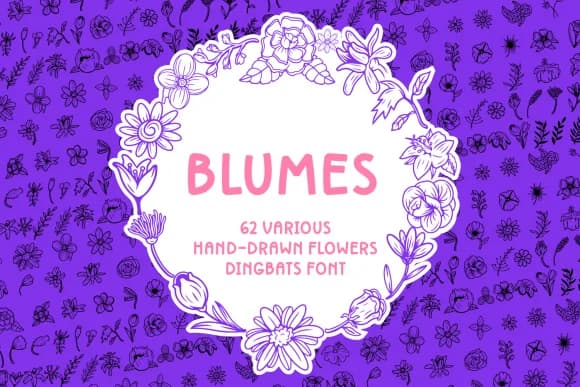
Blumes evokes the feeling of wildflowers pressed between the pages of an old book. Created by Creative Fabrica Fonts, this OTF dingbat collection contains 62 hand-rendered flower characters that carry that organic, hand-drawn sensibility throughout.
These botanical ornaments shine as borders and frames for wedding invitation suites, where they add romance without overwhelming the text. They work beautifully on Etsy product labels for artisan skincare lines, specialty tea packaging, or homemade jam jars, giving small makers a way to stand out from mass-produced competitors. Greeting card designers find them essential for spring announcements and Mother's Day creations. Bullet journal enthusiasts and planner customizers also gravitate toward them for adding seasonal flourishes to monthly spreads and goal pages. The hand-crafted feel means each bloom reads as intentional and carefully chosen rather than generic or placeholder.
Pair Blumes with a neutral serif or geometric sans-serif to let the florals remain the design's focal point. The contrast between decorative dingbats and readable body text is what makes layouts sing. Find this font on Creative Fabrica and begin layering botanical character into your next project.
Style & Use Cases
- Overall Style
- Iconographic, Spring Font
- Use Case
- Icons, Accents
- Ideal For
- ornaments, bullets, and decorative flourishes
- Pairs With
- any text font
How to Install Blumes Font
Step-by-step instructions for every platform
- 1Download the Blumes font file (.ttf or .otf).
- 2Locate the downloaded file in your Downloads folder.
- 3Right-click the font file.
- 4Select "Install" to install for the current user, or "Install for all users" to make it available system-wide.
- 5Blumes is now available in Word, Photoshop, Illustrator, and all other apps.
More by Creative Fabrica Fonts
View all →
Browse fonts by theme
Curated collections →Saw a font in a picture? Identify any font from an image with our free Font Finder.
More Dingbats Fonts
Browse all →







What pairs well with Blumes Font?
Blumes Font is a versatile dingbats font that works for both headings and body text. Pair it with a contrasting sans-serif or serif font to add visual interest and a clear distinction between titles and body copy.



Blumes Font
Reviewed by the FontBoxDL team · Updated June 2026