
 1 / 8
1 / 8About Blossom Vase Font
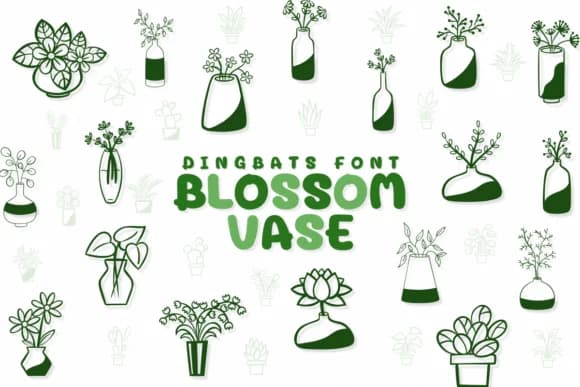
Blossom Vase by Chonada is a collection of floral dingbats drawn in clean line art, offering delicate botanical motifs and potted plant symbols that work beautifully across your creative projects. The icons capture the simplicity and charm of garden life through refined outlines, each one carefully designed to feel cohesive as a set. Use these for wedding invitation suites with botanical flair, Etsy shop listings featuring artisan plants, custom seed packet designs, plant care guides, and gardening blog headers. The font bridges the gap between purely decorative and genuinely functional, working just as well on printed wedding programs and stationery as it does on social media graphics and handmade labels for a small herb garden or plant shop.
The versatility here makes a real difference. These symbols work for packaging design in plant-themed small businesses, botanical journal layouts, nursery menus, and home decor signage where you need a consistent visual language. Each icon maintains the same refined aesthetic, so layering different floral elements together feels intentional rather than random or chaotic. Available in a single weight with comprehensive visual consistency, the dingbats integrate smoothly into both digital designs and printed materials without clashing.
Grab Blossom Vase on Creative Fabrica to add genuine botanical character to your next project.
Style & Use Cases
- Overall Style
- Iconographic, Blossom
- Use Case
- Icons, Accents
- Ideal For
- ornaments, bullets, and decorative flourishes
- Pairs With
- any text font
How to Install Blossom Vase Font
Step-by-step instructions for every platform
- 1Download the Blossom Vase font file (.ttf or .otf).
- 2Locate the downloaded file in your Downloads folder.
- 3Right-click the font file.
- 4Select "Install" to install for the current user, or "Install for all users" to make it available system-wide.
- 5Blossom Vase is now available in Word, Photoshop, Illustrator, and all other apps.




Browse fonts by theme
Curated collections →Saw a font in a picture? Identify any font from an image with our free Font Finder.
More Dingbats Fonts
Browse all →







What pairs well with Blossom Vase Font?
Blossom Vase Font is a versatile dingbats font that works for both headings and body text. Pair it with a contrasting sans-serif or serif font to add visual interest and a clear distinction between titles and body copy.



Blossom Vase Font
by Chonada
Reviewed by the FontBoxDL team · Updated June 2026