 Firefox
 1 / 10
About Blooming Elegant Font
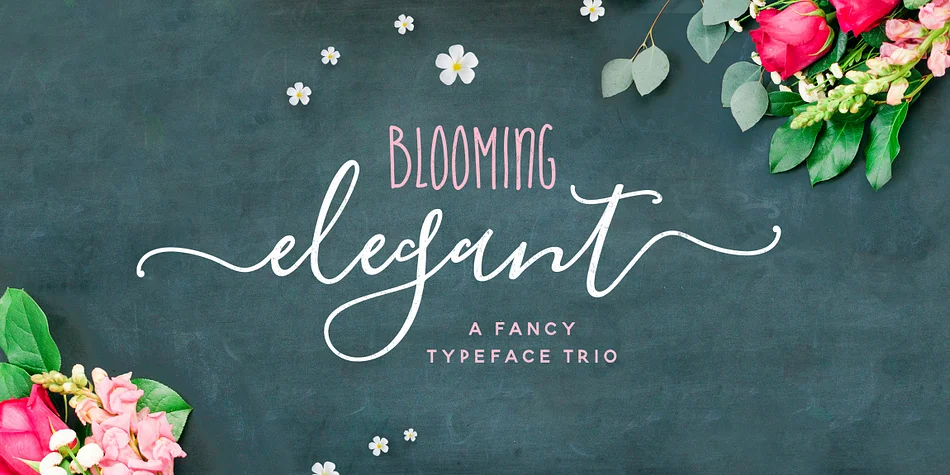
Blooming Elegant walks that line between refined and playful. Designed by Nicky Laatz, this collection brings together a flowing hand-lettered script with useful companion sans fonts, so you can mix and match depending on what each project calls for.
The script comes in three weights (Regular, Mono-line, and Mono-line Bold) with OpenType Stylistic Alternates for lowercase and ligatures built in, giving you plenty of room to layer authenticity into your work without feeling repetitive. Wedding invitation suites benefit from the fluidity, greeting cards feel personal and handmade, and social media graphics get that handcrafted warmth that actually stops the scroll. You can also use it for custom journal spreads and planner layouts where a script needs room to breathe on the page. The paired sans fonts give you two distinct flavors: the structured companion works for formal layouts and professional branding, while the playful handwritten version handles designs that need lightness and movement.
Beyond the fonts themselves, you get over 120 hand-drawn doodles split across two dingbat fonts, which means actual embellishments rather than a generic clip-art grab bag. Pair the script with a clean, minimal sans-serif for body text to create breathing room and maintain readability. Head to Creative Fabrica and add this versatile family to your collection.
Style & Use Cases
- Overall Style
- Iconographic
- Use Case
- Icons, Accents
- Ideal For
- ornaments, bullets, and decorative flourishes
- Pairs With
- any text font
How to Install Blooming Elegant Font
Step-by-step instructions for every platform
- 1Download the Blooming Elegant font file (.ttf or .otf).
- 2Locate the downloaded file in your Downloads folder.
- 3Right-click the font file.
- 4Select "Install" to install for the current user, or "Install for all users" to make it available system-wide.
- 5Blooming Elegant is now available in Word, Photoshop, Illustrator, and all other apps.
More by Nicky Laatz
View all →

Browse fonts by theme
Curated collections →Saw a font in a picture? Identify any font from an image with our free Font Finder.
More Dingbats Fonts
Browse all →







What pairs well with Blooming Elegant Font?
Blooming Elegant Font is a versatile dingbats font that works for both headings and body text. Pair it with a contrasting sans-serif or serif font to add visual interest and a clear distinction between titles and body copy.




Blooming Elegant Font
by Nicky Laatz
Reviewed by the FontBoxDL team · Updated August 2026