
 1 / 8
1 / 8About Black Halloween Font
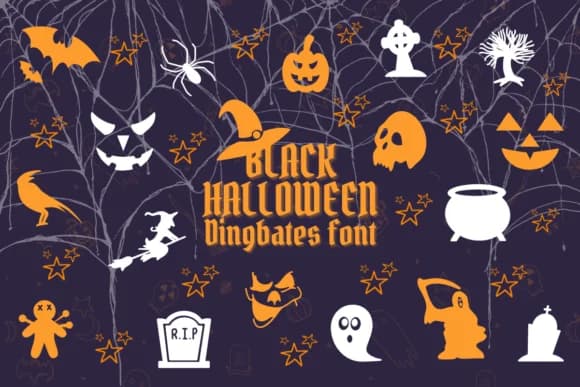
You're designing Halloween party invitations and realize you need something with more visual personality than a stock typeface. Black Halloween by Chonada is a dingbat font where each character becomes a Halloween icon: pumpkins, ghosts, witches, bats, and spiders, all rendered in a loose, hand-drawn style. The approach feels genuinely playful rather than overly polished, which is exactly what carries seasonal work.
Use it for personalized trick-or-treat bag tags, October event postcards, haunted house promotional posters, and DIY craft banners where personality matters more than hierarchy. The icons work at large sizes without breaking apart, so you can build spooky sticker sheets, party favor labels, and social media graphics confidently. Because it's structured as a typeface, you can type combinations and rearrange them instantly rather than hunting for individual images. It's remarkably efficient for seasonal projects that still look carefully designed.
Black Halloween reads well on its own for decorative headlines and pairs naturally with clean sans-serif body copy. The cartoon doodle aesthetic keeps things feeling accessible rather than heavy-handed. Find it on Creative Fabrica to add it to your Halloween toolkit.
Style & Use Cases
- Overall Style
- Iconographic, Doodle
- Use Case
- Icons, Accents
- Ideal For
- ornaments, bullets, and decorative flourishes
- Pairs With
- any text font
How to Install Black Halloween Font
Step-by-step instructions for every platform
- 1Download the Black Halloween font file (.ttf or .otf).
- 2Locate the downloaded file in your Downloads folder.
- 3Right-click the font file.
- 4Select "Install" to install for the current user, or "Install for all users" to make it available system-wide.
- 5Black Halloween is now available in Word, Photoshop, Illustrator, and all other apps.




Browse fonts by theme
Curated collections →Saw a font in a picture? Identify any font from an image with our free Font Finder.
More Dingbats Fonts
Browse all →







What pairs well with Black Halloween Font?
Black Halloween Font is a versatile dingbats font that works for both headings and body text. Pair it with a contrasting sans-serif or serif font to add visual interest and a clear distinction between titles and body copy.



Black Halloween Font
by Chonada
Reviewed by the FontBoxDL team · Updated July 2026