 Firefox
 1 / 5
1 / 5About Big Pixel Font
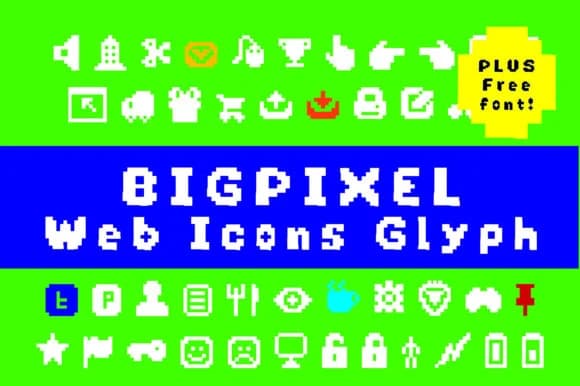
Big Pixel delivers a set of blocky, web-focused symbols rendered in the unmistakable retro computer aesthetic that dominated 90s internet design. Created by GraphicsBam Fonts, this dingbats font captures chunky pixelated icons with genuine utility, pulling from classic web conventions like directional arrows, mail symbols, toggle buttons, and interface elements that somehow still feel relevant today.
The modular design works beautifully for vintage website navigation systems, chiptune-inspired podcast cover art, retro gaming UI mockups, and nostalgia-driven social media graphics. Because each icon sits at a consistent weight and pixel grid, they layer and mix cleanly without the awkwardness you often get from decorative fonts built on different construction logic. Use it for arcade-style merchandise labels, indie game sprite sheets with that classic 8-bit vibe, 90s-themed portfolio sites, or symbol sets backing a tech history blog. The font's clear, sturdy letterforms hold up across sizes and maintain their personality without degrading.
This is the natural choice for designers chasing that Y2K or pixelated aesthetic without reaching for generic tech icon sets. The retro web revival has real staying power, and Big Pixel sits at the center of it. Grab it on Creative Fabrica and pair it with display typefaces to complete the effect.
Style & Use Cases
- Overall Style
- Iconographic, Computer
- Use Case
- Icons, Accents
- Ideal For
- ornaments, bullets, and decorative flourishes
- Pairs With
- any text font
How to Install Big Pixel Font
Step-by-step instructions for every platform
- 1Download the Big Pixel font file (.ttf or .otf).
- 2Locate the downloaded file in your Downloads folder.
- 3Right-click the font file.
- 4Select "Install" to install for the current user, or "Install for all users" to make it available system-wide.
- 5Big Pixel is now available in Word, Photoshop, Illustrator, and all other apps.
More by GraphicsBam Fonts
View all →
Browse fonts by theme
Curated collections →Saw a font in a picture? Identify any font from an image with our free Font Finder.
More Dingbats Fonts
Browse all →







What pairs well with Big Pixel Font?
Big Pixel Font is a versatile dingbats font that works for both headings and body text. Pair it with a contrasting sans-serif or serif font to add visual interest and a clear distinction between titles and body copy.



Big Pixel Font
Reviewed by the FontBoxDL team · Updated July 2026