 Firefox
 1 / 3
1 / 3About Big Chuck Font
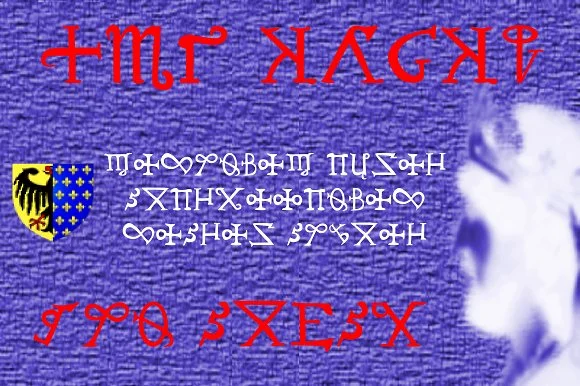
Big Chuck by Proportional Lime is a decorative dingbat system inspired by Charlemagne's formative influence on medieval script development and the cryptic symbol systems of that historical era. Rather than a traditional typeface, this font delivers a comprehensive set of ornamental and functional symbols that capture the historical intrigue of protected communications, cleverly reimagined for contemporary design work.
The symbol collection shines across several practical design contexts: editorial layouts that need distinctive decorative markers, vintage invitation suites with custom ornamental borders, historical fiction book design, and game interfaces drawing from medieval aesthetics. Makers and crafters find particular value in the symbol set for wood-burning stencil projects and laser-cut design files. Branding applications in heritage sectors, artisanal goods, and boutique publishing benefit from the authentic historical texture and coded-symbol vocabulary it brings to their visual identity systems.
Each symbol holds its own visual weight without overwhelming layouts. The symbols work equally well as standalone decorative elements, repeating borders, framing systems, or supporting ornamental components within larger compositions. Period-piece designers appreciate the historical authenticity, while anyone seeking decoration with genuine character will find unexpected depth in the collection. Add Big Chuck to your Creative Fabrica library and explore what medieval-inspired symbolism can contribute to your next project.
Style & Use Cases
- Overall Style
- Iconographic
- Use Case
- Icons, Accents
- Ideal For
- ornaments, bullets, and decorative flourishes
- Pairs With
- any text font
How to Install Big Chuck Font
Step-by-step instructions for every platform
- 1Download the Big Chuck font file (.ttf or .otf).
- 2Locate the downloaded file in your Downloads folder.
- 3Right-click the font file.
- 4Select "Install" to install for the current user, or "Install for all users" to make it available system-wide.
- 5Big Chuck is now available in Word, Photoshop, Illustrator, and all other apps.
More by Proportional Lime
View all →

Browse fonts by theme
Curated collections →Saw a font in a picture? Identify any font from an image with our free Font Finder.
More Dingbats Fonts
Browse all →







What pairs well with Big Chuck Font?
Big Chuck Font is a versatile dingbats font that works for both headings and body text. Pair it with a contrasting sans-serif or serif font to add visual interest and a clear distinction between titles and body copy.




Big Chuck Font
Reviewed by the FontBoxDL team · Updated August 2026