 Firefox
 1 / 4
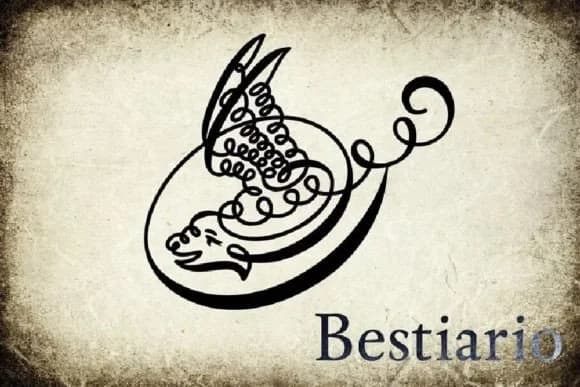
1 / 4About Bestiario Font
Bestiario by Intellecta Design is a dingbat typeface drawn from the historical penmanship of John Seddon, a 17th-century English writing master whose ornamental hand shapes influenced calligraphy for centuries. The design is rooted in Seddon's famous "The Pen-mans Paradise" from 1695, which showcased elaborate flourishes and animal forms rendered through pure penwork. Here, those baroque animal and human figures have been carefully revived and adapted into individual characters, preserving the intricate detail and historical authenticity of the originals while making them accessible for contemporary design.
The typeface shines in projects where ornamental tradition meets contemporary craft and genuine skill. Use it for luxury packaging on high-end chocolate and specialty tea boxes, wedding invitation suites that call for historical elegance, fine art book endpapers and illustrated margins, or custom stationery that demands genuine character over mass-produced perfection. Each glyph carries the gesture of hand-drawn penmanship, making it feel personal rather than sterile. This is the kind of font you reach for when period accuracy and decorative sophistication matter equally, whether designing certificates with antique flair or letterpress compositions that need visual depth. Find Bestiario on Creative Fabrica and bring refined heritage to your most distinguished work.
Style & Use Cases
- Overall Style
- Iconographic, Calligraphy
- Use Case
- Icons, Accents
- Ideal For
- ornaments, bullets, and decorative flourishes
- Pairs With
- any text font
How to Install Bestiario Font
Step-by-step instructions for every platform
- 1Download the Bestiario font file (.ttf or .otf).
- 2Locate the downloaded file in your Downloads folder.
- 3Right-click the font file.
- 4Select "Install" to install for the current user, or "Install for all users" to make it available system-wide.
- 5Bestiario is now available in Word, Photoshop, Illustrator, and all other apps.
More by Intellecta Design
View all →
Browse fonts by theme
Curated collections →Saw a font in a picture? Identify any font from an image with our free Font Finder.
More Dingbats Fonts
Browse all →







What pairs well with Bestiario Font?
Bestiario Font is a versatile dingbats font that works for both headings and body text. Pair it with a contrasting sans-serif or serif font to add visual interest and a clear distinction between titles and body copy.



Bestiario Font
Reviewed by the FontBoxDL team · Updated July 2026