
 1 / 8
1 / 8About Berger Font
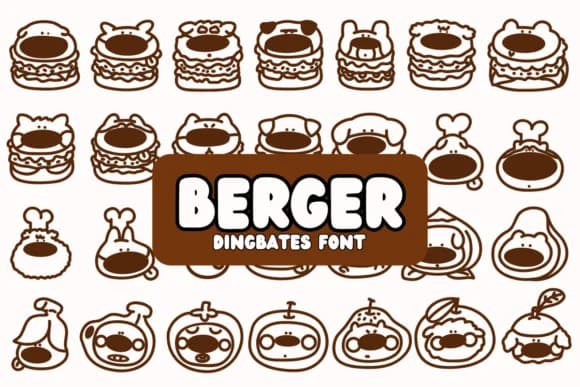
Berger by Chonada is a whimsical dingbat collection that pairs cartoon dogs with burger designs, creating a lighthearted visual language built entirely for food-focused creative work. The concept is simple but charming: each glyph swaps out traditional letterforms for a different dog-and-sandwich pairing, with the top bun cleverly mimicking a pup's head. The inventive approach makes the font instantly recognizable and deeply engaging to use across any layout or design format.
The character set works beautifully in casual restaurant menus, fast food branding projects, and deli signage that genuinely needs personality and humor rather than corporate styling. Food truck wraps, burger joint promotional materials, and quirky sandwich shop packaging all benefit tremendously from this playful visual language and warmth. The cohesive doodle style ensures every character feels perfectly at home with the others, so you can combine glyphs freely without worrying about visual discord. It works equally well for kids' lunch box illustrations, a local brewpub's burger special board, or food delivery app menu designs that demand a lighter touch.
When you need to inject genuine warmth and humor into food-related design work, this delivers. Grab Berger on Creative Fabrica and start building menus and graphics that actually make people pause and smile.
Style & Use Cases
- Overall Style
- Iconographic, Doodle
- Use Case
- Icons, Accents
- Ideal For
- ornaments, bullets, and decorative flourishes
- Pairs With
- any text font
How to Install Berger Font
Step-by-step instructions for every platform
- 1Download the Berger font file (.ttf or .otf).
- 2Locate the downloaded file in your Downloads folder.
- 3Right-click the font file.
- 4Select "Install" to install for the current user, or "Install for all users" to make it available system-wide.
- 5Berger is now available in Word, Photoshop, Illustrator, and all other apps.




Browse fonts by theme
Curated collections →Saw a font in a picture? Identify any font from an image with our free Font Finder.
More Dingbats Fonts
Browse all →







What pairs well with Berger Font?
Berger Font is a versatile dingbats font that works for both headings and body text. Pair it with a contrasting sans-serif or serif font to add visual interest and a clear distinction between titles and body copy.



Berger Font
by Chonada
Reviewed by the FontBoxDL team · Updated July 2026