 Firefox
 1 / 9
1 / 9About Belforge Geometric Bold Sans Font
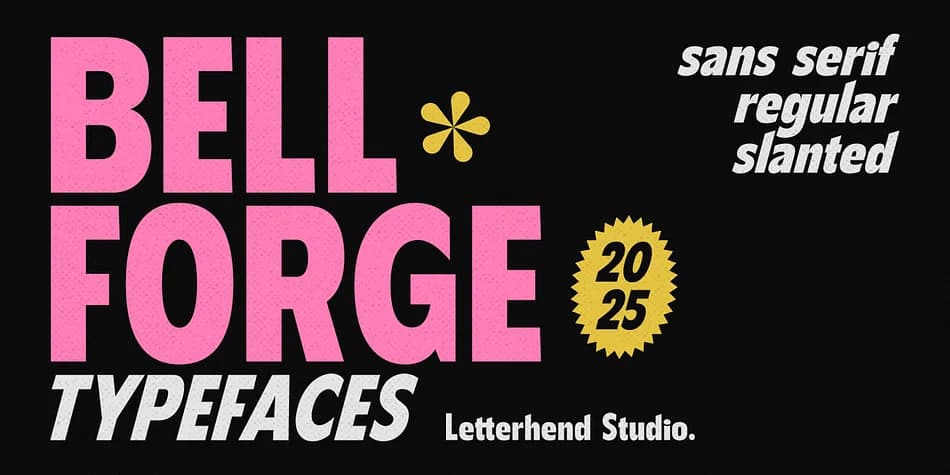
Belforge Geometric Bold Sans, designed by Letterhend Studio, pairs thick, squared letterforms with clean edges that feel both retro and contemporary. The geometric proportions and substantial weight create immediate visual impact, a striking quality that headlines and identity systems depend on when they need to communicate with force.
This typeface excels when projects demand strong, confident letterforms. Music album packaging and vinyl record labels benefit from its presence, especially for independent releases or vintage-inspired compilations. Vintage-style poster campaigns gain strength from the geometric solidity and visual weight. Bold product labels for boutique brands, event program covers, and retro-aesthetic branding systems all find a natural home here. The typeface includes both cases, complete with numbers and punctuation, plus alternates and ligatures for added flexibility and character. Multilingual support and PUA encoding ensure you can push its capabilities across various languages and special character needs.
Belforge naturally suits designers and brands with mid-century sensibilities, especially those building identities rooted in retro visual language. Set it for heritage brand headlines or craft merchandise with vintage flair, and this weight delivers the graphic strength and confidence needed. Explore it on Creative Fabrica and experiment with how it can define your next project with character.
Style & Use Cases
- Overall Style
- Bold, Distinctive
- Use Case
- Headlines, Posters
- Ideal For
- logos, packaging, and standout titles
- Pairs With
- a neutral sans-serif
How to Install Belforge Geometric Bold Sans Font
Step-by-step instructions for every platform
- 1Download the Belforge Geometric Bold Sans font file (.ttf or .otf).
- 2Locate the downloaded file in your Downloads folder.
- 3Right-click the font file.
- 4Select "Install" to install for the current user, or "Install for all users" to make it available system-wide.
- 5Belforge Geometric Bold Sans is now available in Word, Photoshop, Illustrator, and all other apps.
More by Letterhend Studio
View all →
Browse fonts by theme
Curated collections →Saw a font in a picture? Identify any font from an image with our free Font Finder.
More Decorative Fonts
Browse all →







What pairs well with Belforge Geometric Bold Sans Font?
Belforge Geometric Bold Sans Font is a decorative font that shines as a display or heading face. Pair it with a clean sans-serif or serif font for body text — the contrast creates a clear hierarchy while the two styles stay balanced and easy to read.



Belforge Geometric Bold Sans Font
Reviewed by the FontBoxDL team · Updated July 2026