 Firefox
 1 / 5
1 / 5About Beautiful Leaves Font
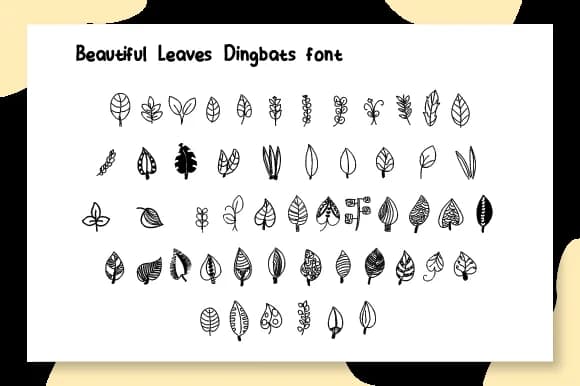
Organic and whimsical, this typeface captures the delicate charm of botanicals in vector form. Beautiful Leaves by Ciriative is a dingbat collection that trades letter characters for an array of leaf shapes, floral elements, and nature-inspired line work. Each glyph serves as a decorative building block, giving you dozens of organic shapes to work with across all standard keyboard characters.
The real utility surfaces when you're designing botanical wedding invitation suites that need ornamental borders and leaf illustrations without hunting through clip art libraries. Seasonal greeting cards gain character from its range of shapes, while herbal product packaging benefits from these elements framing minimalist type. Craft enthusiasts will find it invaluable for nature-themed scrapbooking layouts, pressed flower project headers, and hand-lettered botanical journal covers that call for genuine nature aesthetics rather than generic flourishes. It's the kind of font that makes the designer's job easier by providing ready-made organic texture.
Pair Beautiful Leaves with a clean serif like Garamond or a modern sans-serif such as Inter to keep text readable alongside the decorative elements. Grab it from Creative Fabrica and start layering these botanical shapes into your work.
Style & Use Cases
- Overall Style
- Iconographic, Floral Font
- Use Case
- Icons, Accents
- Ideal For
- ornaments, bullets, and decorative flourishes
- Pairs With
- any text font
How to Install Beautiful Leaves Font
Step-by-step instructions for every platform
- 1Download the Beautiful Leaves font file (.ttf or .otf).
- 2Locate the downloaded file in your Downloads folder.
- 3Right-click the font file.
- 4Select "Install" to install for the current user, or "Install for all users" to make it available system-wide.
- 5Beautiful Leaves is now available in Word, Photoshop, Illustrator, and all other apps.
More by Ciriative
View all →

Browse fonts by theme
Curated collections →Saw a font in a picture? Identify any font from an image with our free Font Finder.
More Dingbats Fonts
Browse all →







What pairs well with Beautiful Leaves Font?
Beautiful Leaves Font is a versatile dingbats font that works for both headings and body text. Pair it with a contrasting sans-serif or serif font to add visual interest and a clear distinction between titles and body copy.



Beautiful Leaves Font
by Ciriative
Reviewed by the FontBoxDL team · Updated July 2026