 Firefox
 1 / 7
1 / 7About Banner Font
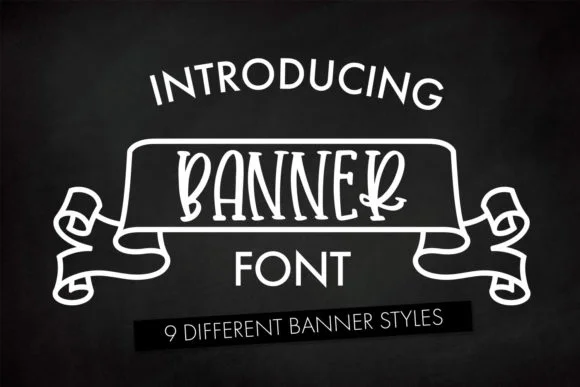
You're putting together custom wedding invitation suites and need lettering that feels genuinely personal without veering into overly precious territory. Banner, designed by Freelingdesignhouse, offers exactly that kind of visual balance. It's a playful, hand-lettered display face that functions as a dingbat font and brings authentic character to any project it touches. As an SVG font, it maintains crisp, sharp detail even at large sizes, making it ideal for event labels, Etsy product packaging, boutique skincare branding, and DIY vinyl decal projects where real personality is central to the overall appeal.
The casual, informal quality of Banner works equally well in modern branding contexts, from handmade craft signage to distinctive logo concepts that need genuine warmth without looking dated or generic. Its quirky hand-drawn character adds humanity to layouts without feeling forced or overly trendy, which means designs tend to hold up visually well over time. As an SVG format, it delivers excellent scalability advantages and consistently clean edges across the full range of sizes you might need, whether working at large display scales or smaller applications.
Find Banner on Creative Fabrica and add it to your working collection of display fonts that genuinely bring something special and character to the work.
Style & Use Cases
- Overall Style
- Iconographic, Svg Font
- Use Case
- Icons, Accents
- Ideal For
- ornaments, bullets, and decorative flourishes
- Pairs With
- any text font
How to Install Banner Font
Step-by-step instructions for every platform
- 1Download the Banner font file (.ttf or .otf).
- 2Locate the downloaded file in your Downloads folder.
- 3Right-click the font file.
- 4Select "Install" to install for the current user, or "Install for all users" to make it available system-wide.
- 5Banner is now available in Word, Photoshop, Illustrator, and all other apps.
Browse fonts by theme
Curated collections →Saw a font in a picture? Identify any font from an image with our free Font Finder.
More Dingbats Fonts
Browse all →







What pairs well with Banner Font?
Banner Font is a versatile dingbats font that works for both headings and body text. Pair it with a contrasting sans-serif or serif font to add visual interest and a clear distinction between titles and body copy.




Banner Font
Reviewed by the FontBoxDL team · Updated July 2026