 Firefox
 1 / 8
1 / 8Loading font…
About Badges Doodle Font
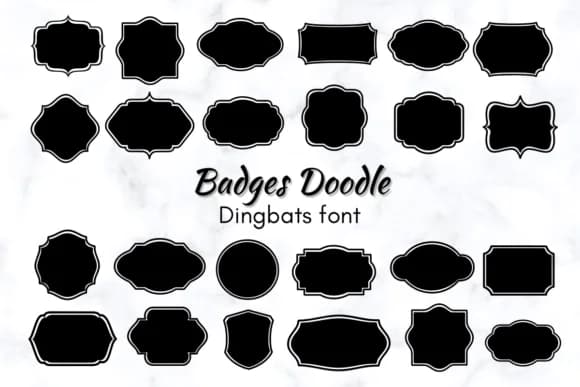
Badges Doodle collects hand-drawn badge shapes and decorative flourishes designed to work as standalone elements or layered accents within a larger composition. Created by Nun Sukhwan, this dingbat font trades visual complexity for genuine charm, offering a library of medallions, ribbons, and playful frames that read as handmade rather than slapped-in from some generic clip-art collection. The character set spans various badge silhouettes and floral flourishes in a single font file, giving you range without requiring multiple typefaces.
This is the font you reach for when your design needs real human warmth instead of corporate polish. Teacher-made achievement stickers work beautifully in this style, as do hand-lettered Valentine's Day card embellishments and custom medal designs for school events. Craft sticker sheets for bullet journals tap into the same aesthetic, while indie t-shirt labels and small-batch product packaging benefit from that handmade feeling that e-commerce customers have come to expect. The shapes scale well from tiny accent marks to large focal points without losing character or legibility.
Badges Doodle is built for anyone making intentional, handcrafted projects: teachers building reward systems, indie makers adding branded touches, or designers sourcing authentic-looking embellishments. Find it on Creative Fabrica and start incorporating these shapes into work that actually feels like you made it.
Style & Use Cases
- Overall Style
- Iconographic, Dingbats Font
- Use Case
- Icons, Accents
- Ideal For
- ornaments, bullets, and decorative flourishes
- Pairs With
- any text font
How to Install Badges Doodle Font
Step-by-step instructions for every platform
- 1Download the Badges Doodle font file (.ttf or .otf).
- 2Locate the downloaded file in your Downloads folder.
- 3Right-click the font file.
- 4Select "Install" to install for the current user, or "Install for all users" to make it available system-wide.
- 5Badges Doodle is now available in Word, Photoshop, Illustrator, and all other apps.
More by Nun Sukhwan
View all →



Browse fonts by theme
Curated collections →Saw a font in a picture? Identify any font from an image with our free Font Finder.
More Dingbats Fonts
Browse all →







What pairs well with Badges Doodle Font?
Badges Doodle Font is a versatile dingbats font that works for both headings and body text. Pair it with a contrasting sans-serif or serif font to add visual interest and a clear distinction between titles and body copy.



Badges Doodle Font
by Nun Sukhwan
Reviewed by the FontBoxDL team · Updated October 2026