 Firefox
 1 / 7
1 / 7About Azalleia Ornaments Font
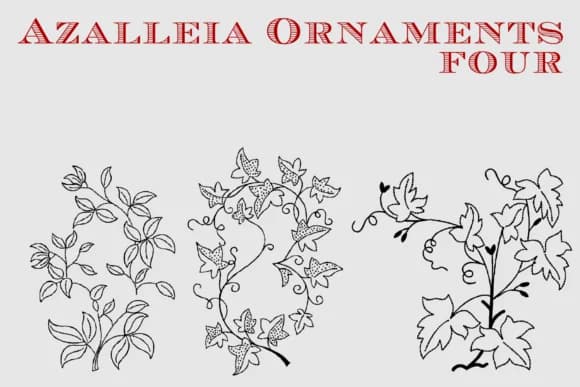
This typeface brings the warmth of handmade craft into your digital work. Azalleia Ornaments, crafted by Intellecta Design, is an ornamental font built entirely on genuine hand-drawn details rather than computer-generated patterns. That distinction matters because it gives the symbols real character and authenticity that purely digital alternatives simply cannot replicate.
Each symbol carries the aesthetic of old embroidery templates and cross-stitch guides, genuinely capturing what made vintage needlework so compelling to look at and use. You'll find it works beautifully for vintage wedding invitation suites, DIY greeting card designs, scrapbooking page layouts, decorative elements in craft instruction books, and pages in handbound journals or artist sketchbooks. The intricate flourishes bring that handcrafted quality to projects, offering a depth you cannot achieve with standard dingbats or mass-produced ornament sets. Building a rustic packaging design or composing pages for a collector's journal both benefit from this font's balanced ornamental weight, which anchors layouts without overwhelming the composition or crowding the visual space.
Pair Azalleia Ornaments with a traditional serif or warm neutral sans-serif for body text, and let the ornaments shine as confident, supportive elements. Grab it from Creative Fabrica and add this handcrafted typeface to your growing collection.
Style & Use Cases
- Overall Style
- Iconographic, Azalleia Ornaments
- Use Case
- Icons, Accents
- Ideal For
- ornaments, bullets, and decorative flourishes
- Pairs With
- any text font
How to Install Azalleia Ornaments Font
Step-by-step instructions for every platform
- 1Download the Azalleia Ornaments font file (.ttf or .otf).
- 2Locate the downloaded file in your Downloads folder.
- 3Right-click the font file.
- 4Select "Install" to install for the current user, or "Install for all users" to make it available system-wide.
- 5Azalleia Ornaments is now available in Word, Photoshop, Illustrator, and all other apps.
More by Intellecta Design
View all →
Browse fonts by theme
Curated collections →Saw a font in a picture? Identify any font from an image with our free Font Finder.
More Dingbats Fonts
Browse all →







What pairs well with Azalleia Ornaments Font?
Azalleia Ornaments Font is a versatile dingbats font that works for both headings and body text. Pair it with a contrasting sans-serif or serif font to add visual interest and a clear distinction between titles and body copy.



Azalleia Ornaments Font
Reviewed by the FontBoxDL team · Updated July 2026