 Firefox
 1 / 7
1 / 7About Astone Update Font
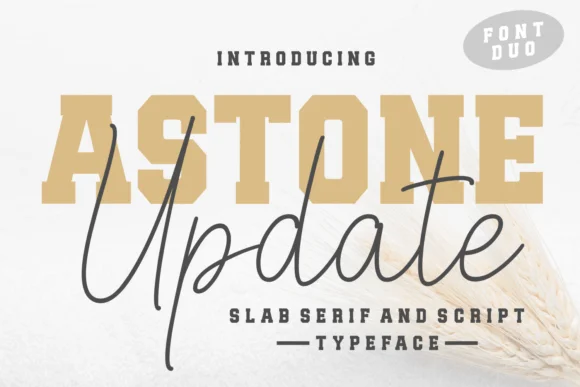
You're designing a wedding invitation suite and the client wants something that feels both bold and genuinely romantic. That's where Astone Update, Andrian Dehasta's slab serif, comes in. It's got real weight and presence throughout, but the proportions stay warm and accessible instead of cold or overly corporate, giving you that confident-yet-inviting mood that clients actually want.
The font shines across many different applications. Wedding invitation suites benefit tremendously from its balance of formality and warmth. Custom t-shirt designs pop with its weight, particularly when you're printing larger silhouettes or working on statement pieces. Beauty product labels and boutique skincare packaging look refined with its structured proportions and steady rhythm. Quote graphics destined for Instagram or Pinterest use the boldness to command the feed without needing any extra decorative elements to carry the message.
At large display sizes, the slab serif structure reads with genuine clarity and doesn't feel cramped or cluttered on the page. Even smaller point sizes hold together remarkably well. This means you can use the same typeface across headlines and supporting text without needing a secondary font to do the heavy lifting. You can find Astone Update on Creative Fabrica and add it to your collection.
Style & Use Cases
- Overall Style
- Sturdy, Confident, Slab Serif
- Use Case
- Headlines, Merch
- Ideal For
- vintage posters, logos, and product packaging
- Pairs With
- a light sans-serif
How to Install Astone Update Font
Step-by-step instructions for every platform
- 1Download the Astone Update font file (.ttf or .otf).
- 2Locate the downloaded file in your Downloads folder.
- 3Right-click the font file.
- 4Select "Install" to install for the current user, or "Install for all users" to make it available system-wide.
- 5Astone Update is now available in Word, Photoshop, Illustrator, and all other apps.
More by Andrian Dehasta
View all →
Browse fonts by theme
Curated collections →Saw a font in a picture? Identify any font from an image with our free Font Finder.
More Slab Serif Fonts
Browse all →







What pairs well with Astone Update Font?
Astone Update Font is a slab serif font that shines as a display or heading face. Pair it with a clean sans-serif or serif font for body text — the contrast creates a clear hierarchy while the two styles stay balanced and easy to read.




Astone Update Font
Reviewed by the FontBoxDL team · Updated September 2026