 Firefox
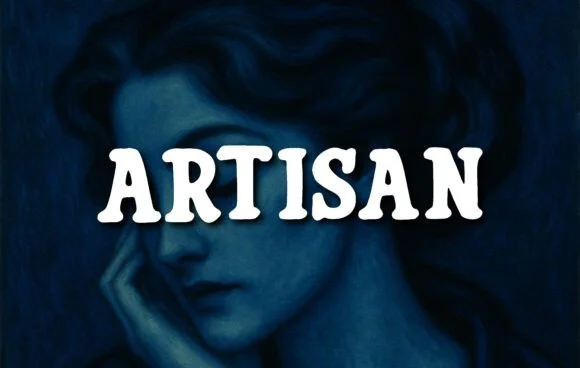 1 / 5
1 / 5About Artisan Font
Artisan, designed by OliviaFontCo, derives its personality from thick, geometric letterforms that land somewhere between sturdy and inviting. The slab serif strokes are bold and declarative, paired with subtle curves that warm things up without dulling the typeface's commanding edge. This push-pull between weight and charm means the font works equally well for projects that need strength or a touch of the handmade.
The real versatility shows on vintage band posters, craft beer labels, and wedding invitation suites, where designers need letterforms that feel genuine rather than mass-produced. Bookstore signage, teacher resource materials, and boutique product packaging all benefit from its substantial presence and personality. The weighty construction gives your type immediate authority and intention, while the handcrafted sensibility keeps it from reading as corporate or sterile. Teachers, design studios, and small business owners recognize that kind of reliability.
Retro branding projects, print collateral campaigns, and children's book covers lean on Artisan specifically because it delivers character without veering into pastiche. The construction feels timeless across both modern and vintage contexts, which is why it stays useful through changing aesthetics. Grab it on Creative Fabrica and let this typeface do the heavy lifting for any brief that demands personality and substance.
Style & Use Cases
- Overall Style
- Sturdy, Confident, Artisan
- Use Case
- Headlines, Merch
- Ideal For
- vintage posters, logos, and product packaging
- Pairs With
- a light sans-serif
How to Install Artisan Font
Step-by-step instructions for every platform
- 1Download the Artisan font file (.ttf or .otf).
- 2Locate the downloaded file in your Downloads folder.
- 3Right-click the font file.
- 4Select "Install" to install for the current user, or "Install for all users" to make it available system-wide.
- 5Artisan is now available in Word, Photoshop, Illustrator, and all other apps.
More by OliviaFontCo
View all →

Browse fonts by theme
Curated collections →Saw a font in a picture? Identify any font from an image with our free Font Finder.
More Slab Serif Fonts
Browse all →







What pairs well with Artisan Font?
Artisan Font is a slab serif font that shines as a display or heading face. Pair it with a clean sans-serif or serif font for body text — the contrast creates a clear hierarchy while the two styles stay balanced and easy to read.




Artisan Font
by OliviaFontCo
Reviewed by the FontBoxDL team · Updated September 2026