 Firefox
 1 / 8
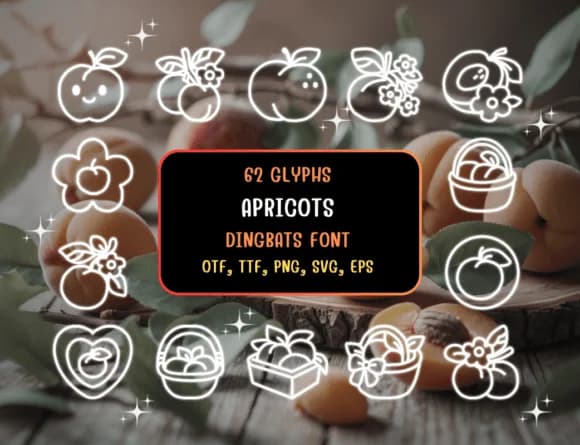
1 / 8About Apricots Font
You're designing a farmers market label and need something playful but not cartoonish: something that makes people smile without screaming for attention. Apricots, created by Distiny4919, is a dingbat font that delivers exactly that feeling through a collection of hand-drawn fruit illustrations. Each keystroke pulls up a different doodle, so you can layer, mix, and match to build custom patterns and standalone icons that feel fresh every time.
The applications run deeper than decorative type usually does. Food packaging labels and farmers market signage benefit from its organic warmth, while botanical recipe cards and small farm guides get personality that stock icons simply can't match. Craft stickers for small businesses, children's book illustrations, botanical print projects, and seasonal greeting cards all gain character from this kind of font when designers need something specific and tactile. The hand-drawn rendering ensures everything looks homemade, not mass-produced.
You get multiple file formats to work with: TTF and OTF for desktop work, SVG and EPS for vector editing, plus PNG files for web and print mockups. This format flexibility means Canva, Procreate, and most design software will recognize what you're working with. Grab it on Creative Fabrica and stop hunting for the right illustration when you can simply type it instead.
Style & Use Cases
- Overall Style
- Iconographic, Apricot Dingbats
- Use Case
- Icons, Accents
- Ideal For
- ornaments, bullets, and decorative flourishes
- Pairs With
- any text font
How to Install Apricots Font
Step-by-step instructions for every platform
- 1Download the Apricots font file (.ttf or .otf).
- 2Locate the downloaded file in your Downloads folder.
- 3Right-click the font file.
- 4Select "Install" to install for the current user, or "Install for all users" to make it available system-wide.
- 5Apricots is now available in Word, Photoshop, Illustrator, and all other apps.
Browse fonts by theme
Curated collections →Saw a font in a picture? Identify any font from an image with our free Font Finder.
More Dingbats Fonts
Browse all →







What pairs well with Apricots Font?
Apricots Font is a versatile dingbats font that works for both headings and body text. Pair it with a contrasting sans-serif or serif font to add visual interest and a clear distinction between titles and body copy.



Apricots Font
by Distiny4919
Reviewed by the FontBoxDL team · Updated June 2026