 Firefox
 1 / 8
1 / 8About Apples Font
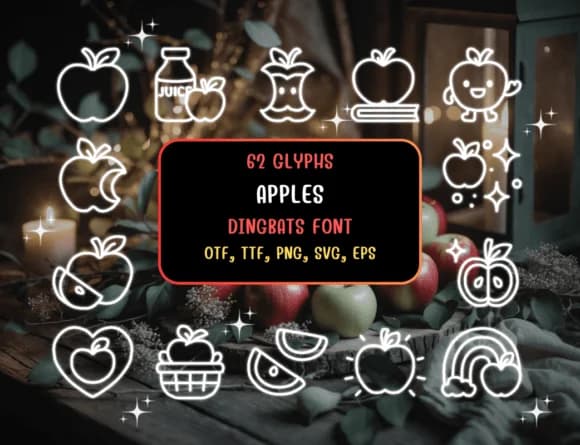
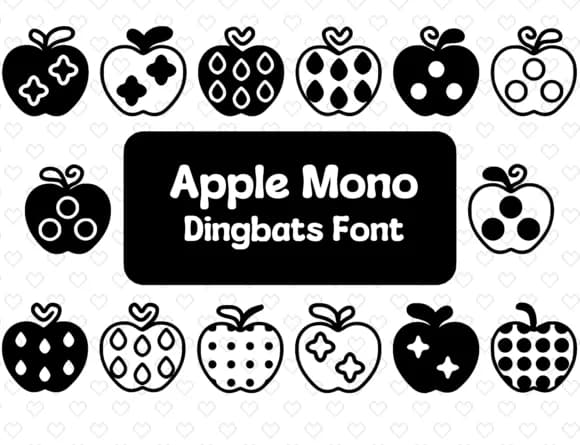
Warmth and playfulness radiate from this collection of hand-drawn dingbats. Apples, designed by Distiny4919, replaces the standard keyboard with a series of sketched apple illustrations, each carrying the natural, unpretentious feeling of pencil work rather than generated algorithms.
This font genuinely appeals to designers who gravitate toward organic, tactile aesthetics. Teachers building back-to-school bulletin boards and classroom materials will find immediate, practical use for these icons. Owners of farmers markets and small orchards can tap these illustrations for product labels, price tags, and wooden signage that communicates harvest-fresh authenticity without seeming overly polished or corporate. Content creators developing recipe cards, food blog graphics, and styled photography can layer these doodles into compositions that reinforce a handmade, artisanal sensibility. Scrapbooking enthusiasts and paper crafters gain a full vocabulary of apple shapes and styles: each letter keystroke produces a different illustration, giving you freedom to build varied layouts without hitting repetition across your page.
Pair these playful graphics with a restrained sans-serif for body text so both typefaces breathe independently. You'll discover Apples on Creative Fabrica, where it waits to add character and authentic texture to projects that benefit from sketched, hand-drawn warmth.
Style & Use Cases
- Overall Style
- Iconographic, Apples Dingbats
- Use Case
- Icons, Accents
- Ideal For
- ornaments, bullets, and decorative flourishes
- Pairs With
- any text font
How to Install Apples Font
Step-by-step instructions for every platform
- 1Download the Apples font file (.ttf or .otf).
- 2Locate the downloaded file in your Downloads folder.
- 3Right-click the font file.
- 4Select "Install" to install for the current user, or "Install for all users" to make it available system-wide.
- 5Apples is now available in Word, Photoshop, Illustrator, and all other apps.
Browse fonts by theme
Curated collections →Saw a font in a picture? Identify any font from an image with our free Font Finder.
More Dingbats Fonts
Browse all →







What pairs well with Apples Font?
Apples Font is a versatile dingbats font that works for both headings and body text. Pair it with a contrasting sans-serif or serif font to add visual interest and a clear distinction between titles and body copy.



Apples Font
by Distiny4919
Reviewed by the FontBoxDL team · Updated August 2026