 Firefox
 1 / 8
1 / 8About Apple Emotion Font
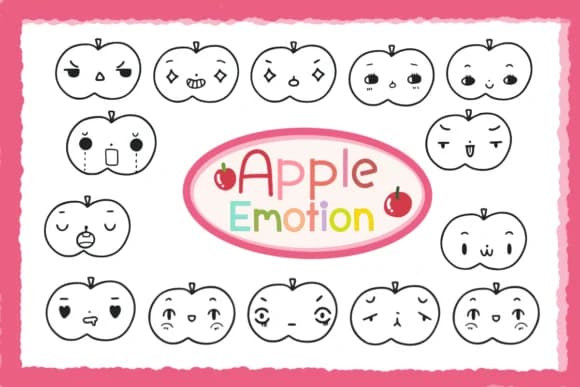
Hand-drawn apple and emoji characters with playful, expressive details define this dingbats collection from the start. Apple Emotion, created by Foam-Design Store, delivers a full set of stylized fruit icons and emotion symbols that feel genuinely personal and sketch-like rather than sterile or generic. Each glyph carries real character and presence, making these far more compelling for layering into your designs than treating them as mere decoration.
The font shines in bullet journal spreads, classroom planner layouts, and gift tag designs where hand-crafted warmth genuinely improves the final piece. Teachers and small business owners reach for it when creating custom sticker sheets, embellishing product labels, and designing Etsy printables. It works equally well in worksheets, greeting cards, event invitations, and digital presentations where a softer visual approach serves the content better than rigid icon fonts do. Since dingbat fonts rely on keyboard character substitution, you'll find these symbols map cleanly to standard characters, making implementation straightforward across desktop applications and web platforms.
This is the font for makers and educators who refuse to compromise on personality and warmth in their materials and layouts. If you're building planner pages, DIY craft projects, or teaching resources that need visual charm and character, Apple Emotion belongs in your collection. Get it on Creative Fabrica and bring that hand-drawn spirit into your next creative project.
Style & Use Cases
- Overall Style
- Iconographic, Apple Font
- Use Case
- Icons, Accents
- Ideal For
- ornaments, bullets, and decorative flourishes
- Pairs With
- any text font
How to Install Apple Emotion Font
Step-by-step instructions for every platform
- 1Download the Apple Emotion font file (.ttf or .otf).
- 2Locate the downloaded file in your Downloads folder.
- 3Right-click the font file.
- 4Select "Install" to install for the current user, or "Install for all users" to make it available system-wide.
- 5Apple Emotion is now available in Word, Photoshop, Illustrator, and all other apps.
More by Foam-Design Store
View all →

Browse fonts by theme
Curated collections →Saw a font in a picture? Identify any font from an image with our free Font Finder.
More Dingbats Fonts
Browse all →







What pairs well with Apple Emotion Font?
Apple Emotion Font is a versatile dingbats font that works for both headings and body text. Pair it with a contrasting sans-serif or serif font to add visual interest and a clear distinction between titles and body copy.



Apple Emotion Font
Reviewed by the FontBoxDL team · Updated August 2026