 Firefox
 1 / 8
1 / 8About Apple Font
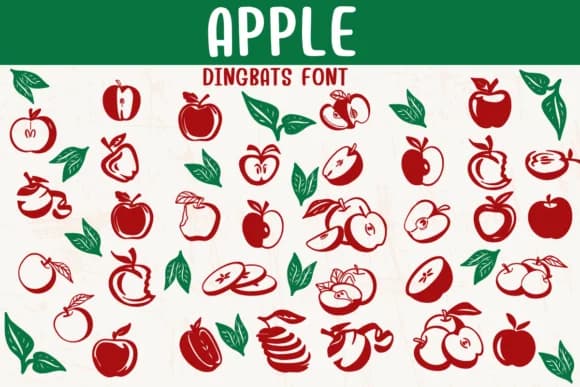
Sontaya's Apple font replaces standard letters with cheerful fruit imagery: whole apples, slices, leaves, and halves rendered in warm, inviting colors. A dingbats collection at its core, it brings organic visual warmth to any design. Each character becomes an illustration rather than a character, making this font particularly effective when you want graphic elements instead of words.
This font works beautifully for teacher-created worksheets and classroom activities where a visual, playful approach matters. It's equally at home in DIY kraft labels for homemade jam or honey, farmer's market signage that needs visual punch, and scrapbooking layouts where every detail should feel considered. Within the character set you'll find multiple apple forms, giving you flexibility to mix and match imagery throughout a design. The consistent color palette ties everything together across greeting cards for kids, reward sticker sheets, classroom printables, and social media graphics for food-focused brands and wellness bloggers.
Small food producers, educators, and crafters who need graphics that feel handmade and approachable rather than polished will find this collection invaluable. Working across print and digital projects, it maintains its charm and legibility throughout all applications. Find Apple on Creative Fabrica and start building your collection of playful dingbat assets.
Style & Use Cases
- Overall Style
- Iconographic, Diy
- Use Case
- Icons, Accents
- Ideal For
- ornaments, bullets, and decorative flourishes
- Pairs With
- any text font
How to Install Apple Font
Step-by-step instructions for every platform
- 1Download the Apple font file (.ttf or .otf).
- 2Locate the downloaded file in your Downloads folder.
- 3Right-click the font file.
- 4Select "Install" to install for the current user, or "Install for all users" to make it available system-wide.
- 5Apple is now available in Word, Photoshop, Illustrator, and all other apps.
Browse fonts by theme
Curated collections →Saw a font in a picture? Identify any font from an image with our free Font Finder.
More Dingbats Fonts
Browse all →







What pairs well with Apple Font?
Apple Font is a versatile dingbats font that works for both headings and body text. Pair it with a contrasting sans-serif or serif font to add visual interest and a clear distinction between titles and body copy.



Apple Font
by Sontaya
Reviewed by the FontBoxDL team · Updated June 2026