 Firefox
 1 / 8
1 / 8Loading font…
About Antlers Font
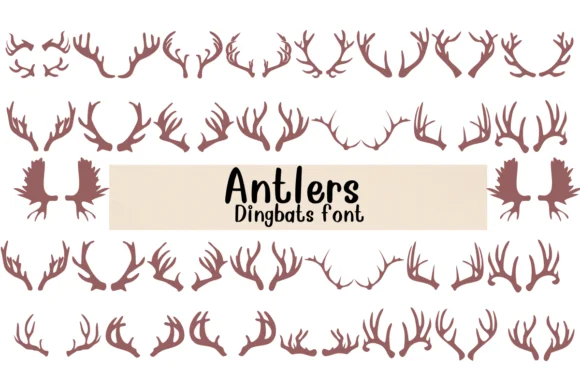
Antlers by Nongyao is a decorative dingbats font built entirely from stylized cervid and wildlife symbols rather than traditional letterforms. You get a carefully drawn collection of antler-inspired marks and beast iconography rendered in a tribal, vector-based aesthetic that reads authentic without feeling heavy-handed. This makes it perfect for layering ornamental elements into woodland wedding invitation suites, outdoor adventure brand identities, and rustic lodge signage where you need nature-rooted visual texture without relying on literal photography or generic nature graphics.
The symbol set shines in cabin and hunting-themed packaging design, where a single glyph can add authentic regional character to product labels or brand marks. Because it's structured as a true symbol font available in both OTF and TTF formats, you can kern and scale each mark independently, creating custom border treatments, decorative dividers, or thematic spot illustrations across print and digital projects alike. Designers working in Procreate, Affinity Designer, or Affinity Photo will find it integrates cleanly as both a coloring outline font and a finished vector graphic ready to customize.
Get Antlers on Creative Fabrica when you need ornamental wildlife symbols with genuine character and specificity to anchor your next design project.
Style & Use Cases
- Overall Style
- Iconographic, Fonts
- Use Case
- Icons, Accents
- Ideal For
- ornaments, bullets, and decorative flourishes
- Pairs With
- any text font
How to Install Antlers Font
Step-by-step instructions for every platform
- 1Download the Antlers font file (.ttf or .otf).
- 2Locate the downloaded file in your Downloads folder.
- 3Right-click the font file.
- 4Select "Install" to install for the current user, or "Install for all users" to make it available system-wide.
- 5Antlers is now available in Word, Photoshop, Illustrator, and all other apps.




Browse fonts by theme
Curated collections →Saw a font in a picture? Identify any font from an image with our free Font Finder.
More Dingbats Fonts
Browse all →







What pairs well with Antlers Font?
Antlers Font is a versatile dingbats font that works for both headings and body text. Pair it with a contrasting sans-serif or serif font to add visual interest and a clear distinction between titles and body copy.




Antlers Font
by Nongyao
Reviewed by the FontBoxDL team · Updated October 2026