 Firefox
 1 / 4
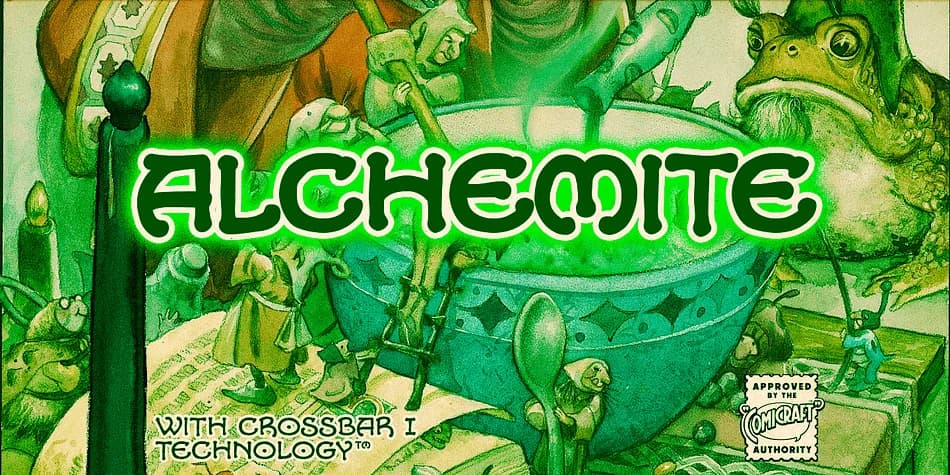
1 / 4About ALCHEMITE Font
This decorative typeface conjures up a distinctly mystical, almost alchemical atmosphere that feels pulled straight from an enchanted medieval tome. Comicraft's ALCHEMITE was originally designed for The Wizard's Tale by Kurt Busiek and David Wenzel, and it carries that narrative weight with genuine visual authority. The letters have an intricate, slightly archaic quality that rewards close looking, working wonderfully in fantasy contexts that need real personality and presence.
Where ALCHEMITE truly shines is in niche applications: comic book dialogue bubbles and character names, cover lettering for fantasy novels, game packaging for tabletop RPGs, and decorative labeling for potion bottle designs or apothecary-style packaging. It's equally at home in indie book layouts, medieval-themed event signage, or D&D character sheet headers. The font comes in four weights with alternate uppercase letterforms, including a stylistic dotless O option, plus support for Western and Central European languages. Crossbar I Technology rounds out the technical toolkit, giving you precise control over individual letterforms when subtle adjustments matter.
Pair ALCHEMITE with a neutral serif or clean sans-serif for any body text you need, since the decorative quality works best when anchored by something restrained and readable. Get it from Creative Fabrica and let your fantasy designs shimmer with genuine otherworldly charm.
Style & Use Cases
- Overall Style
- Bold, Distinctive
- Use Case
- Headlines, Posters
- Ideal For
- logos, packaging, and standout titles
- Pairs With
- a neutral sans-serif
How to Install ALCHEMITE Font
Step-by-step instructions for every platform
- 1Download the ALCHEMITE font file (.ttf or .otf).
- 2Locate the downloaded file in your Downloads folder.
- 3Right-click the font file.
- 4Select "Install" to install for the current user, or "Install for all users" to make it available system-wide.
- 5ALCHEMITE is now available in Word, Photoshop, Illustrator, and all other apps.
More by Comicraft
View all →
Browse fonts by theme
Curated collections →Saw a font in a picture? Identify any font from an image with our free Font Finder.
More Decorative Fonts
Browse all →







What pairs well with ALCHEMITE Font?
ALCHEMITE Font is a decorative font that shines as a display or heading face. Pair it with a clean sans-serif or serif font for body text — the contrast creates a clear hierarchy while the two styles stay balanced and easy to read.



ALCHEMITE Font
by Comicraft
Reviewed by the FontBoxDL team · Updated July 2026