 Firefox
 1 / 6
1 / 6About Acello Font
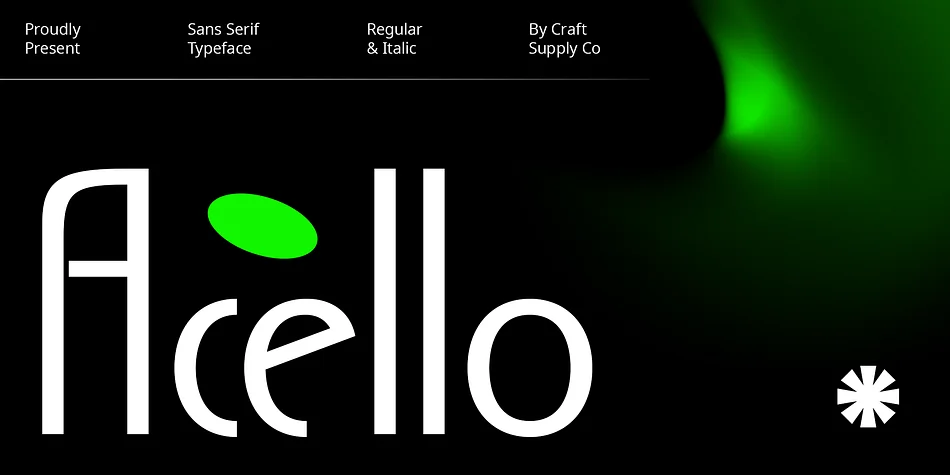
Acello is a geometric sans serif from Craft Supply Co. that strips away unnecessary flourishes in favor of clean, balanced proportions. The letterforms feel contemporary without chasing trends, working equally well at large display sizes or squeezed into tight spaces where clarity matters most. What sets it apart is how the geometric construction creates visual rhythm across words and headlines, making even simple text feel intentional and carefully considered rather than an afterthought.
This typeface serves particularly well for brand identity work, from sleek tech startup logos to upscale cosmetics packaging that needs understated sophistication. It handles magazine cover headlines and retail signage where a modern, no-nonsense voice matters. Corporate presentation decks benefit from its clarity and precision, while social media graphics gain a polished edge when this font carries the message. The balanced proportions mean characters align naturally, creating visual coherence across logos, packaging, and digital interfaces.
Acello fits best in projects where restraint reads as strength. Consider it for beauty product labeling, corporate presentation materials, architectural firm identities, and editorial layouts where genuine weight and substance without decoration matters most. Get it on Creative Fabrica and add it to your typographic toolkit.
Style & Use Cases
- Overall Style
- Bold, Distinctive
- Use Case
- Headlines, Posters
- Ideal For
- logos, packaging, and standout titles
- Pairs With
- a neutral sans-serif
How to Install Acello Font
Step-by-step instructions for every platform
- 1Download the Acello font file (.ttf or .otf).
- 2Locate the downloaded file in your Downloads folder.
- 3Right-click the font file.
- 4Select "Install" to install for the current user, or "Install for all users" to make it available system-wide.
- 5Acello is now available in Word, Photoshop, Illustrator, and all other apps.
More by Craft Supply Co.
View all →
Browse fonts by theme
Curated collections →Saw a font in a picture? Identify any font from an image with our free Font Finder.
More Decorative Fonts
Browse all →







What pairs well with Acello Font?
Acello Font is a decorative font that shines as a display or heading face. Pair it with a clean sans-serif or serif font for body text — the contrast creates a clear hierarchy while the two styles stay balanced and easy to read.




Acello Font
Reviewed by the FontBoxDL team · Updated June 2026