 Firefox
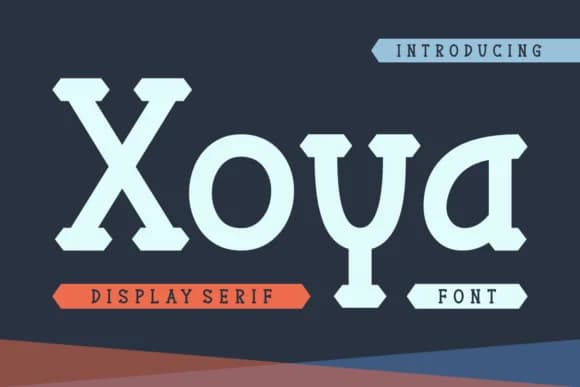 1 / 7
1 / 7About Xoya Font
You're laying out a product label for a small-batch jam company, or designing a poster for an upcoming design festival. Something with real personality is what you're after, a typeface that reads bold and modern without feeling generic or mass-produced. That's Xoya, created by Riman at 7NTypes. This slab serif has a quirky confidence baked into its structure, something that serves established luxury brands and independent makers alike.
Xoya excels on product packaging labels, greeting card and stationery suites, promotional event posters, and hand-painted shop signage. Its clean slab construction keeps everything sharp and legible at large display sizes, and that's the whole point of a display typeface anyway. Accented characters are included, and multilingual support means you can design across borders and language barriers. The typeface doesn't need effects or tricks to have impact.
What makes Xoya practical is that its weight and structure do the visual work on their own. Adding effects or unnecessary flourishes would only dilute what the typeface already brings. It also works well with digital cutting tools, making it handy for physical projects like labels, signage, or craft applications. Get Xoya from Creative Fabrica and add it to your working collection of typefaces that deliver both visual impact and reliability.
Style & Use Cases
- Overall Style
- Sturdy, Confident, Slab Serif
- Use Case
- Headlines, Merch
- Ideal For
- vintage posters, logos, and product packaging
- Pairs With
- a light sans-serif
How to Install Xoya Font
Step-by-step instructions for every platform
- 1Download the Xoya font file (.ttf or .otf).
- 2Locate the downloaded file in your Downloads folder.
- 3Right-click the font file.
- 4Select "Install" to install for the current user, or "Install for all users" to make it available system-wide.
- 5Xoya is now available in Word, Photoshop, Illustrator, and all other apps.
More by Riman (7NTypes)
View all →
Browse fonts by theme
Curated collections →Saw a font in a picture? Identify any font from an image with our free Font Finder.
More Slab Serif Fonts
Browse all →







What pairs well with Xoya Font?
Xoya Font is a slab serif font that shines as a display or heading face. Pair it with a clean sans-serif or serif font for body text — the contrast creates a clear hierarchy while the two styles stay balanced and easy to read.



Xoya Font
Reviewed by the FontBoxDL team · Updated September 2026