 Firefox
 1 / 6
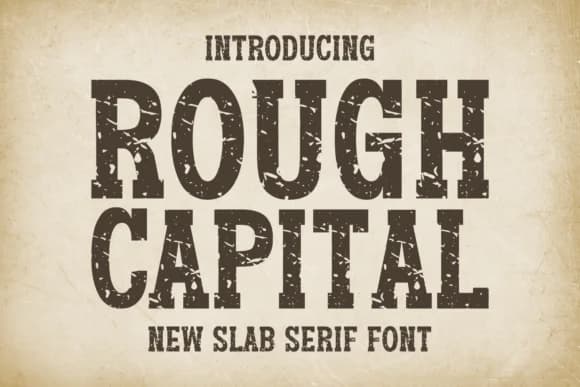
1 / 6About Rough Capital Font
Rough Capital is a slab serif with a deliberately weathered edge that channels the graphic energy of the 70s, 80s, and 90s. Designed by Riman at 7NTypes, this typeface doesn't smooth over its rough surfaces; instead, it leans into them for raw visual impact. The bold, confident letterforms feel substantial and tactile, as though they were stamped or carved rather than merely printed. There's genuine history embedded in the texture, yet the weight and proportion keep everything modern enough for contemporary work without feeling dated.
Those crisp characters work beautifully across edgy logos, brand identity systems, and book cover designs where you need personality instead of polish. Magazine layouts benefit from the strong weight and presence, while packaging labels for indie brands and small makers gain credibility from the retro-industrial aesthetic. Vintage-style posters, craft fair promotional pieces, and product label design all thrive with this typeface. The full multilingual character set supports Eastern European languages, opening the door to international branding projects and cross-market creative work.
This is the typeface for designers and art directors ready to move past safe, contemporary choices. Grab Rough Capital on Creative Fabrica when you need something with genuine character and historical texture that still reads as current.
Style & Use Cases
- Overall Style
- Sturdy, Confident, Slab Serif Typeface
- Use Case
- Headlines, Merch
- Ideal For
- vintage posters, logos, and product packaging
- Pairs With
- a light sans-serif
How to Install Rough Capital Font
Step-by-step instructions for every platform
- 1Download the Rough Capital font file (.ttf or .otf).
- 2Locate the downloaded file in your Downloads folder.
- 3Right-click the font file.
- 4Select "Install" to install for the current user, or "Install for all users" to make it available system-wide.
- 5Rough Capital is now available in Word, Photoshop, Illustrator, and all other apps.
More by Riman (7NTypes)
View all →
Browse fonts by theme
Curated collections →Saw a font in a picture? Identify any font from an image with our free Font Finder.
More Slab Serif Fonts
Browse all →
What pairs well with Rough Capital Font?
Rough Capital Font is a slab serif font that shines as a display or heading face. Pair it with a clean sans-serif or serif font for body text — the contrast creates a clear hierarchy while the two styles stay balanced and easy to read.



Rough Capital Font
Reviewed by the FontBoxDL team · Updated August 2026