
 1 / 8
1 / 8About Winter Flower Font
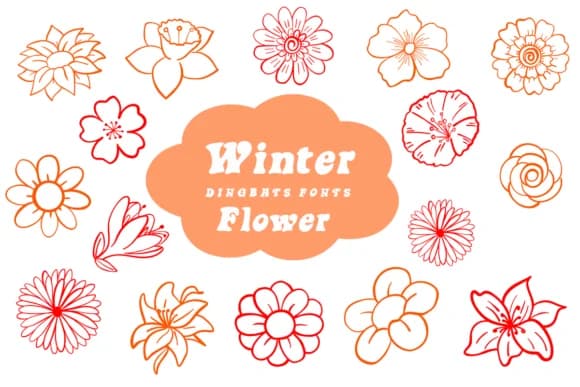
You're spacing out a wedding invitation suite and need florals that feel hand-painted, not clip-art generic. Winter Flower, created by Suphitchaya, is a dingbat collection of delicate flower icons that fills exactly this gap. The set includes everything from simple five-petal blooms to intricate layered arrangements, each one drawn with a loose, organic line quality that reads as genuinely crafted rather than computer-generated. There's real variety in the complexity across the glyphs, which gives you flexibility.
These icons work especially well for wedding stationery, Etsy product labels, boutique skincare packaging, and DIY craft signs where you want botanical flair without commissioning custom illustrations. The hand-drawn aesthetic brings warmth to layouts that might otherwise feel sterile or over-designed. Every glyph has breathing room and character, which matters when you're trying to add personality to something as simple as a small decorative element nestled between text blocks or used as a pattern fill across a full background.
The collection balances restraint with detail throughout. Some flowers are minimalist outlines, others are dense with linework, giving you real choices depending on what your layout actually needs in terms of visual weight. Grab this on Creative Fabrica and keep it on hand for your next project that calls for a natural, illustrated touch without the fuss of hunting down custom artwork.
Style & Use Cases
- Overall Style
- Iconographic, Procreatefont
- Use Case
- Icons, Accents
- Ideal For
- ornaments, bullets, and decorative flourishes
- Pairs With
- any text font
How to Install Winter Flower Font
Step-by-step instructions for every platform
- 1Download the Winter Flower font file (.ttf or .otf).
- 2Locate the downloaded file in your Downloads folder.
- 3Right-click the font file.
- 4Select "Install" to install for the current user, or "Install for all users" to make it available system-wide.
- 5Winter Flower is now available in Word, Photoshop, Illustrator, and all other apps.
More by Suphitchaya
View all →
Browse fonts by theme
Curated collections →Saw a font in a picture? Identify any font from an image with our free Font Finder.
More Dingbats Fonts
Browse all →







What pairs well with Winter Flower Font?
Winter Flower Font is a versatile dingbats font that works for both headings and body text. Pair it with a contrasting sans-serif or serif font to add visual interest and a clear distinction between titles and body copy.



Winter Flower Font
by Suphitchaya
Reviewed by the FontBoxDL team · Updated June 2026