
 1 / 6
1 / 6About Whikey Font
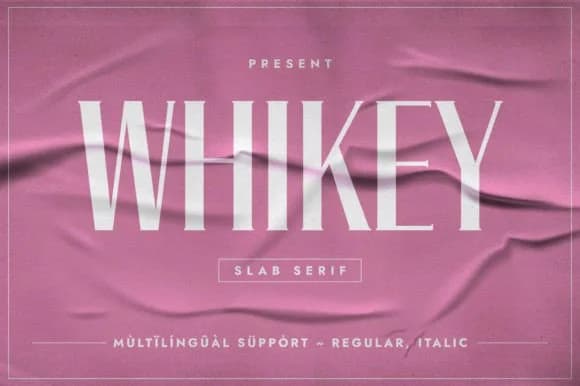
Whikey by Minimalistartstudio is a bold slab serif built for display applications, with strong geometric bones and generous stroke contrast that commands immediate visual attention. The thick letterforms sit comfortably between 70s sensibility and contemporary elegance, never reading as pure pastiche but rather genuinely current and functional. Each character carries substantial weight while maintaining solid legibility, making it work dependably across different sizes.
Wedding invitation suites benefit immediately from this typeface's real sophistication and authority, while boutique packaging labels gain strong visual impact from its commanding presence. Restaurant menu headlines, event signage, and high-end beauty product branding all showcase Whikey's distinctive personality effectively at display scale. The real value lies in its strong performance even at moderately sized applications where the bold slab construction keeps every letter sharp and readable, areas where pure display typefaces typically falter. Designers tackling vintage-inspired editorial layouts, modern luxury branding, or any project calling for distinctive serif character and weight will genuinely appreciate what this typeface brings to their finished work.
Explore Whikey on Creative Fabrica and bring a typeface with genuine presence and personality to your next project.
Style & Use Cases
- Overall Style
- Sturdy, Confident, 70s
- Use Case
- Headlines, Merch
- Ideal For
- vintage posters, logos, and product packaging
- Pairs With
- a light sans-serif
How to Install Whikey Font
Step-by-step instructions for every platform
- 1Download the Whikey font file (.ttf or .otf).
- 2Locate the downloaded file in your Downloads folder.
- 3Right-click the font file.
- 4Select "Install" to install for the current user, or "Install for all users" to make it available system-wide.
- 5Whikey is now available in Word, Photoshop, Illustrator, and all other apps.
More by Minimalistartstudio
View all →



Browse fonts by theme
Curated collections →Saw a font in a picture? Identify any font from an image with our free Font Finder.
More Slab Serif Fonts
Browse all →







What pairs well with Whikey Font?
Whikey Font is a slab serif font that shines as a display or heading face. Pair it with a clean sans-serif or serif font for body text — the contrast creates a clear hierarchy while the two styles stay balanced and easy to read.



Whikey Font
Reviewed by the FontBoxDL team · Updated September 2026