
 1 / 5
1 / 5About Wedding Leaves Font
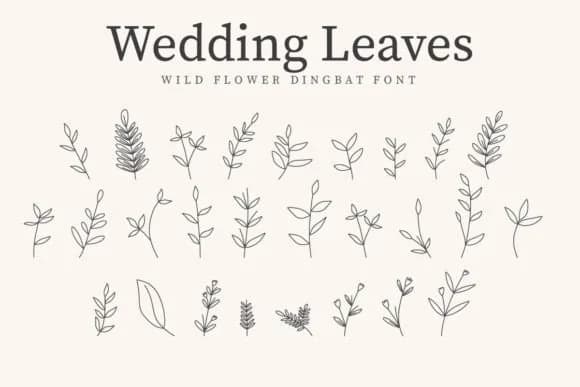
Organic and romantic without feeling overwrought. Wedding Leaves from CraftedType Studio is a botanical dingbat font that brings natural elegance to design work. The leafy, flowing symbol characters work particularly well for wedding invitation suites, event place cards, botanical watermarks on luxury packaging, and decorative elements featured on Etsy product listings. A full character set of glyphs gives you genuine design flexibility, letting you layer these botanical shapes across layouts rather than treating them as mere decoration. The characters function as border elements, corner embellishments, or standalone flourishes throughout a composition, giving you real control over visual hierarchy.
This flexibility makes Wedding Leaves especially effective for upscale wedding stationery, DIY craft projects, and custom product branding where handmade aesthetic matters most. You could also use the dingbats solo for monogram backgrounds, section dividers on promotional materials, or decorative touches on business cards and stationery packages. The botanical motifs add visual interest without overwhelming your core design elements. Pair these glyphs with a clean serif typeface for invitation body copy: the serif handles your message while the dingbat characters provide visual breathing room and romantic framing. Find it on Creative Fabrica and add genuine botanical elegance to your next design suite.
Style & Use Cases
- Overall Style
- Iconographic, Sticker Fonts
- Use Case
- Icons, Accents
- Ideal For
- ornaments, bullets, and decorative flourishes
- Pairs With
- any text font
How to Install Wedding Leaves Font
Step-by-step instructions for every platform
- 1Download the Wedding Leaves font file (.ttf or .otf).
- 2Locate the downloaded file in your Downloads folder.
- 3Right-click the font file.
- 4Select "Install" to install for the current user, or "Install for all users" to make it available system-wide.
- 5Wedding Leaves is now available in Word, Photoshop, Illustrator, and all other apps.
More by CraftedType Studio
View all →



Browse fonts by theme
Curated collections →Saw a font in a picture? Identify any font from an image with our free Font Finder.
More Dingbats Fonts
Browse all →







What pairs well with Wedding Leaves Font?
Wedding Leaves Font is a versatile dingbats font that works for both headings and body text. Pair it with a contrasting sans-serif or serif font to add visual interest and a clear distinction between titles and body copy.



Wedding Leaves Font
Reviewed by the FontBoxDL team · Updated July 2026