
 1 / 5
1 / 5About Wedding Butterfly Font
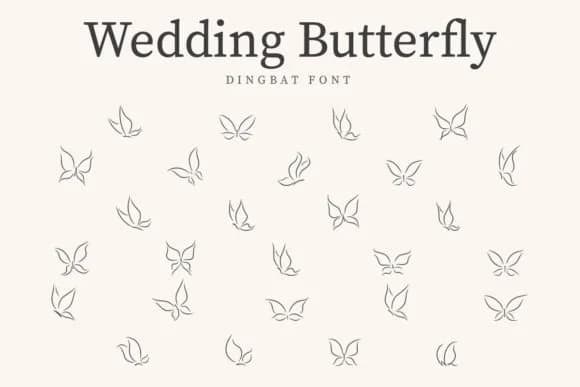
Wedding Butterfly by CraftedType Studio is a dingbat font built entirely around butterfly illustrations, with each character delivering a different decorative insect motif. The glyphs work particularly well for sticker sheets, scrapbooking layouts, and custom planner pages where you want quick visual flourishes without hunting for separate graphics or redrawing elements by hand. If you're designing wedding invitation suites or handmade greeting cards, this font gives you botanical detail without needing illustration skills yourself.
The butterflies also translate beautifully to t-shirt transfers and journal page embellishments, adding visual interest to your layouts. Beyond personal projects, small logos and decorative design elements benefit greatly from the detailed butterfly work. You'll find it especially useful when you need accent elements that feel intentional rather than generic or off-the-shelf. The full character set includes multiple butterfly variations, giving you plenty of options to layer and mix throughout a single project or across related pieces. Whether you're working digitally or prepping files for print production, the consistent line weight and drawing style keeps everything visually cohesive across different applications and formats.
Pick up Wedding Butterfly on Creative Fabrica and start layering these detailed butterfly accents into your greeting cards, planners, and DIY design projects.
Style & Use Cases
- Overall Style
- Iconographic, Wedding Butterfly Font
- Use Case
- Icons, Accents
- Ideal For
- ornaments, bullets, and decorative flourishes
- Pairs With
- any text font
How to Install Wedding Butterfly Font
Step-by-step instructions for every platform
- 1Download the Wedding Butterfly font file (.ttf or .otf).
- 2Locate the downloaded file in your Downloads folder.
- 3Right-click the font file.
- 4Select "Install" to install for the current user, or "Install for all users" to make it available system-wide.
- 5Wedding Butterfly is now available in Word, Photoshop, Illustrator, and all other apps.
More by CraftedType Studio
View all →



Browse fonts by theme
Curated collections →Saw a font in a picture? Identify any font from an image with our free Font Finder.
More Dingbats Fonts
Browse all →







What pairs well with Wedding Butterfly Font?
Wedding Butterfly Font is a versatile dingbats font that works for both headings and body text. Pair it with a contrasting sans-serif or serif font to add visual interest and a clear distinction between titles and body copy.



Wedding Butterfly Font
Reviewed by the FontBoxDL team · Updated July 2026