
 1 / 8
1 / 8About Waves Sea Font
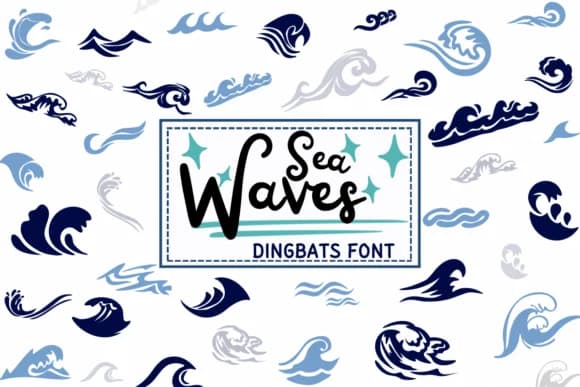
Waves Sea by PraewDesigns is built from a collection of ocean motifs rendered as a dingbat typeface. Each glyph captures a different moment of aquatic motion, from barely-there ripples to full-force swells that seem ready to crest across your page. This range gives designers real flexibility in how they approach layering and composition.
The font shines in tropical wedding stationery (save-the-dates, thank-you cards, place card sets), resort branding and marketing collateral, Etsy product labels for beach-themed goods, and travel agency postcards or promotional materials. Designers appreciate how these symbols add texture and visual interest without requiring photography or complex custom illustration work. You can layer different glyphs to build complete seascapes or drop single waves as typographic accents and decorative flourishes throughout a layout.
This typeface works best for projects that need a coastal, vacation-minded sensibility: boutique hotel websites, artisanal beach product packaging, island destination marketing, or any campaign targeting an audience drawn to leisure and travel themes. Your clients will recognize the ocean reference immediately, and the hand-drawn quality of the letterforms keeps the overall feeling warm rather than corporate or sterile. Grab Waves Sea on Creative Fabrica to start adding it to your creative toolkit.
Style & Use Cases
- Overall Style
- Iconographic, Summer Waves
- Use Case
- Icons, Accents
- Ideal For
- ornaments, bullets, and decorative flourishes
- Pairs With
- any text font
How to Install Waves Sea Font
Step-by-step instructions for every platform
- 1Download the Waves Sea font file (.ttf or .otf).
- 2Locate the downloaded file in your Downloads folder.
- 3Right-click the font file.
- 4Select "Install" to install for the current user, or "Install for all users" to make it available system-wide.
- 5Waves Sea is now available in Word, Photoshop, Illustrator, and all other apps.
More by PraewDesigns
View all →
Browse fonts by theme
Curated collections →Saw a font in a picture? Identify any font from an image with our free Font Finder.
More Dingbats Fonts
Browse all →







What pairs well with Waves Sea Font?
Waves Sea Font is a versatile dingbats font that works for both headings and body text. Pair it with a contrasting sans-serif or serif font to add visual interest and a clear distinction between titles and body copy.



Waves Sea Font
by PraewDesigns
Reviewed by the FontBoxDL team · Updated June 2026