 Firefox
 1 / 3
1 / 3Loading font…
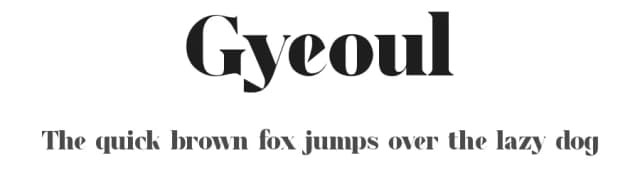
About Wallyoz Font
"Terms Of Use
By downloading or using our font, you are read and accepted to the Our Term and Use Agreement :
This font is copyrighted and protected by the law. Usage of this font on any work without a proper license is deemed illegal. You might get fined at least USD 3000 for this act. Please do understand that we have our own system for tracking the usage of our work on the Internet.
1. This font is Demo ONLY, FOR PERSONAL USE NO COMMERCIAL USE ALLOWED
2. Click this link to purchase on our website :
https://twinletter.com/wallyoz-serif-display-font/
.
Don't forget to follow our social media for updates:
Instagram: twinletter
Facebook: twinletter
Twitter: @twinletter"
Style & Use Cases
- Overall Style
- Classic, Refined, Basic
- Use Case
- Editorial, Print
- Ideal For
- book covers, long-form text, and traditional branding
- Pairs With
- a clean sans-serif for captions
Similar Fonts
Fonts that look visually alike — matched by our Font Finder model.


Wallyoz Specifications
| Font Family | WALLYOZ Trial |
| Style | Regular |
| Full Name | WALLYOZ Trial Regular |
| Version | 1.000 |
| Weight | 400 (Regular) |
| Glyph Count | 414 glyphs |
| PostScript Name | WALLYOZTrial-Regular |
| Designer | Andika |
| Format | TTF (TrueType) |
| File Size | 310.2 KB |
OpenType Features
Wallyoz ships with 7 OpenType features you can switch on in apps that support them (Illustrator, InDesign, Affinity, Figma, CSS font-feature-settings).
- Case-sensitive forms
- Discretionary ligatures
- Fractions
- Standard ligatures
- Ordinals
- Stylistic alternates
- Superscripts
Languages Supported
Wallyoz supports 267 languages.
How to Install Wallyoz Font
Step-by-step instructions for every platform
- 1Download the Wallyoz font file (.ttf or .otf).
- 2Locate the downloaded file in your Downloads folder.
- 3Right-click the font file.
- 4Select "Install" to install for the current user, or "Install for all users" to make it available system-wide.
- 5Wallyoz is now available in Word, Photoshop, Illustrator, and all other apps.
More by twinletter
View all →



Browse fonts by theme
Curated collections →Saw a font in a picture? Identify any font from an image with our free Font Finder.
More Serif Fonts
Browse all →



What pairs well with Wallyoz Font?
Wallyoz Font is a versatile serif font that works for both headings and body text. Pair it with a contrasting sans-serif or slab serif font to add visual interest and a clear distinction between titles and body copy.



Premium Serif Fonts
★ PremiumWant something with more weights, glyphs, and commercial polish? These premium serif fonts are worth a look.


Wallyoz Font
by twinletter
Reviewed by the FontBoxDL team · Updated June 2026
License: Free for personal use