 Firefox
 1 / 6
1 / 6About Violina Font
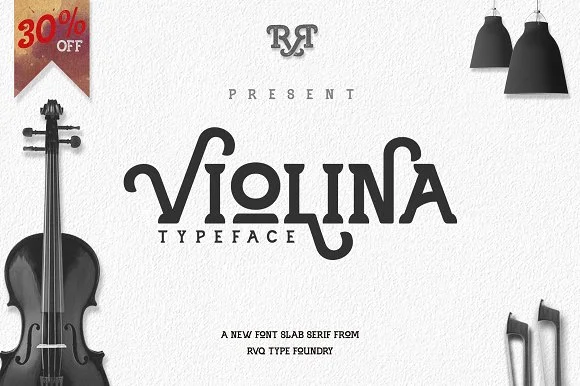
Violina by Rvq Type Foundry is a slab-serif that captures genuine mid-century character without leaning on surface-level nostalgia tricks. The chunky serifs and measured proportions deliver real visual presence and a reassuring solidity that commands attention across any layout you put it on.
Where this typeface really shines is in vintage movie poster designs where bold impact and visual authority matter most, retro restaurant and cafe menus needing genuine warmth and approachability without unnecessary fuss, and craft brewery labels where a handmade-feeling vintage aesthetic feels completely right. Book covers with an antique-inspired sensibility come alive with Violina's confident weight and distinctive personality. Throwback concert or album artwork gets that retro energy just right. The typeface comes in two distinct versions: the Regular keeps things clean and direct for traditional applications, while the Rough variant introduces deliberate texture that mimics age and weathered hand-application, perfect for designs that need added visual expressiveness, grit, and unmistakable character.
That solid slab-serif foundation paired with the lived-in vintage quality opens up uses well beyond the obvious retro categories and applications. Pick up Violina on Creative Fabrica and start working it into your next project.
Style & Use Cases
- Overall Style
- Sturdy, Confident
- Use Case
- Headlines, Merch
- Ideal For
- vintage posters, logos, and product packaging
- Pairs With
- a light sans-serif
How to Install Violina Font
Step-by-step instructions for every platform
- 1Download the Violina font file (.ttf or .otf).
- 2Locate the downloaded file in your Downloads folder.
- 3Right-click the font file.
- 4Select "Install" to install for the current user, or "Install for all users" to make it available system-wide.
- 5Violina is now available in Word, Photoshop, Illustrator, and all other apps.
More by Rvq Type Foundry
View all →
Browse fonts by theme
Curated collections →Saw a font in a picture? Identify any font from an image with our free Font Finder.
More Slab Serif Fonts
Browse all →
What pairs well with Violina Font?
Violina Font is a slab serif font that shines as a display or heading face. Pair it with a clean sans-serif or serif font for body text — the contrast creates a clear hierarchy while the two styles stay balanced and easy to read.




Violina Font
Reviewed by the FontBoxDL team · Updated September 2026