 Firefox
 1 / 8
1 / 8About Vintage Stacked Font
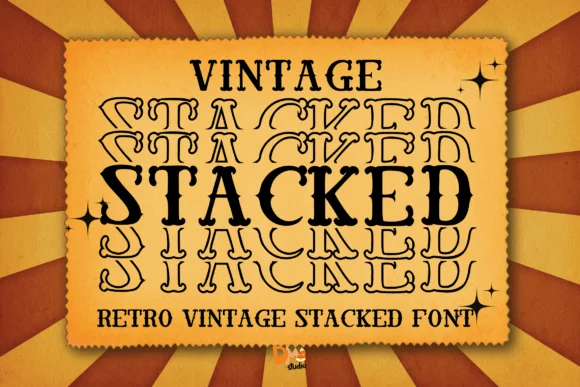
You're designing a vintage concert poster, reaching for something bold enough to grab attention but with that unmistakable 70s aesthetic. Vintage Stacked, designed by Dmletter31, delivers exactly that. This slab-serif typeface layers thick, chunky letterforms into a stacked construction that reads like a genuine throwback without feeling forced or derivative. The geometric structure and substantial weight make it impossible to ignore, especially when blown up to poster size.
The font really shines for retro-minded work. Think vintage band merchandise designs, classic diner signage systems, throwback beer bottle labels, or revival-era book covers. It's equally strong as a standalone logo mark or anchoring a full layout. You get that nostalgic visual punch that makes people do a double-take, whether they're scrolling past or seeing it in a physical space. The stacked letterforms have serious presence at large display sizes, with each character holding its own weight without the overall effect feeling cramped or chaotic.
The font comes with a bold weight that works at any scale, from small applications to massive display use. That kind of versatility makes it genuinely useful across different project types and formats. Find Vintage Stacked on Creative Fabrica and get this typeface into your toolkit.
Style & Use Cases
- Overall Style
- Sturdy, Confident, Vintage Font
- Use Case
- Headlines, Merch
- Ideal For
- vintage posters, logos, and product packaging
- Pairs With
- a light sans-serif
How to Install Vintage Stacked Font
Step-by-step instructions for every platform
- 1Download the Vintage Stacked font file (.ttf or .otf).
- 2Locate the downloaded file in your Downloads folder.
- 3Right-click the font file.
- 4Select "Install" to install for the current user, or "Install for all users" to make it available system-wide.
- 5Vintage Stacked is now available in Word, Photoshop, Illustrator, and all other apps.
Browse fonts by theme
Curated collections →Saw a font in a picture? Identify any font from an image with our free Font Finder.
More Slab Serif Fonts
Browse all →







What pairs well with Vintage Stacked Font?
Vintage Stacked Font is a slab serif font that shines as a display or heading face. Pair it with a clean sans-serif or serif font for body text — the contrast creates a clear hierarchy while the two styles stay balanced and easy to read.




Vintage Stacked Font
by Dmletter31
Reviewed by the FontBoxDL team · Updated September 2026