 Firefox
 1 / 5
1 / 5About Vintage Gothic Font
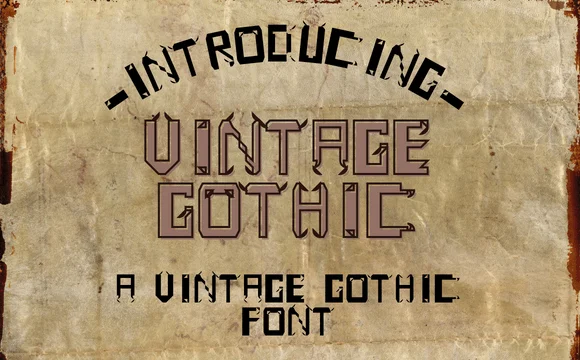
Picture framing a bold quote for a vintage-inspired branding project, and you've got Vintage Gothic by Merlot S doing exactly that. This slab serif brings real weight and unmistakable texture to the canvas, with its thick, deliberate strokes and rough character that feels both raw and refined simultaneously. The font lands somewhere between farmhouse aesthetic and editorial punch, making it a natural fit for rustic wood signage, vintage magazine covers, editorial book jackets, and branding projects where impact matters far more than subtlety.
The all-caps construction keeps things structured and commanding, working brilliantly for t-shirt graphics, greeting card layouts, and product label designs where typography carries the entire visual story. Thick letterforms hold their own at large sizes, so the textured surface reads clearly across headlines and centerpiece layouts alike. Its rough edges prevent the bold weight from feeling sterile, giving finished work that intentional, authentic vintage character clients recognize and want to return to repeatedly.
The texture performs equally well in print and digital applications, holding strong personality through packaging, social graphics, and direct mail pieces. Grab Vintage Gothic from Creative Fabrica to bring that distinctive typographic foundation to your next project.
Style & Use Cases
- Overall Style
- Sturdy, Confident, Slab Serif
- Use Case
- Headlines, Merch
- Ideal For
- vintage posters, logos, and product packaging
- Pairs With
- a light sans-serif
How to Install Vintage Gothic Font
Step-by-step instructions for every platform
- 1Download the Vintage Gothic font file (.ttf or .otf).
- 2Locate the downloaded file in your Downloads folder.
- 3Right-click the font file.
- 4Select "Install" to install for the current user, or "Install for all users" to make it available system-wide.
- 5Vintage Gothic is now available in Word, Photoshop, Illustrator, and all other apps.
Browse fonts by theme
Curated collections →Saw a font in a picture? Identify any font from an image with our free Font Finder.
More Slab Serif Fonts
Browse all →







What pairs well with Vintage Gothic Font?
Vintage Gothic Font is a slab serif font that shines as a display or heading face. Pair it with a clean sans-serif or serif font for body text — the contrast creates a clear hierarchy while the two styles stay balanced and easy to read.




Vintage Gothic Font
by Merlot S
Reviewed by the FontBoxDL team · Updated September 2026