
 1 / 5
1 / 5About Valentine Flower Font
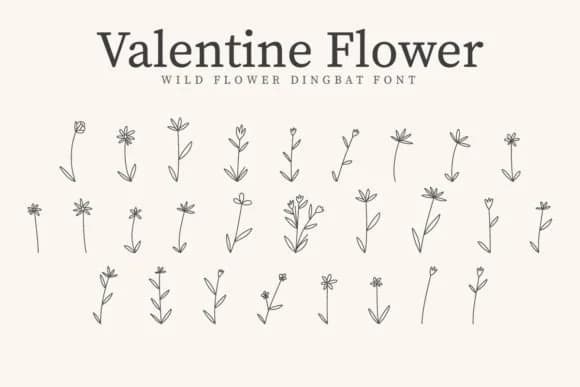
Picture yourself cutting floral dingbats for a run of wedding invitation stickers, each symbol a botanical flourish that feels hand-drawn. Valentine Flower, a symbol font from CraftedType Studio, brings that handmade quality to any craft project or hand-lettering piece. Every character in the full set is a deliberate shape: wildflower heads, leaf arrangements, flowing vines, ornamental branches, and clustered foliage. There's nothing generic here; each symbol functions as a genuine design element that adds personality to your layouts.
The font lives best in projects where botanical texture matters but fussiness doesn't. Think Etsy product packaging for small-batch florals, DIY craft signs and labels, wedding stationery suites where florals anchor the design, boutique skincare labels, and scrapbooking layouts that need repeated floral motifs throughout. The entire character set works as both background fill and foreground accent, giving you real flexibility when layering text and images. You can build borders from the flower shapes, use them as scattered embellishments, or fill negative space with leaf clusters.
What makes this font practical is the consistent line weight across all symbols and how well everything scales at larger sizes. At poster scale or for vinyl cutting, the details stay crisp without muddying. Get it on Creative Fabrica and you'll have a dingbat font that feels like actual botanical illustration.
Style & Use Cases
- Overall Style
- Iconographic, Sticker Fonts
- Use Case
- Icons, Accents
- Ideal For
- ornaments, bullets, and decorative flourishes
- Pairs With
- any text font
How to Install Valentine Flower Font
Step-by-step instructions for every platform
- 1Download the Valentine Flower font file (.ttf or .otf).
- 2Locate the downloaded file in your Downloads folder.
- 3Right-click the font file.
- 4Select "Install" to install for the current user, or "Install for all users" to make it available system-wide.
- 5Valentine Flower is now available in Word, Photoshop, Illustrator, and all other apps.
More by CraftedType Studio
View all →



Browse fonts by theme
Curated collections →Saw a font in a picture? Identify any font from an image with our free Font Finder.
More Dingbats Fonts
Browse all →







What pairs well with Valentine Flower Font?
Valentine Flower Font is a versatile dingbats font that works for both headings and body text. Pair it with a contrasting sans-serif or serif font to add visual interest and a clear distinction between titles and body copy.



Valentine Flower Font
Reviewed by the FontBoxDL team · Updated July 2026