 Firefox
 1 / 6
1 / 6About Trendy Font
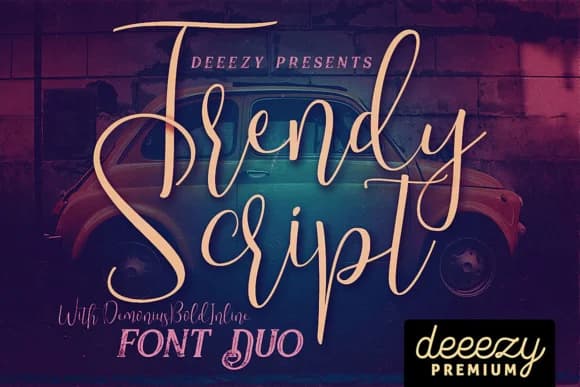
Trendy by JumboDesign is a thin, contemporary script that blends retro sensibilities with modern minimalism. The flowing letterforms carry sophisticated character while maintaining crisp legibility across sizes. This aesthetic makes it particularly well-suited for personal stationery and greeting card designs, where refined typography signals quality and care to recipients. The lightweight construction proves equally effective for boutique product labels, think skincare packaging, artisan tea branding, specialty food design, or handmade cosmetics branding, where minimalist scripts convey both approachability and quiet sophistication. The font family includes Demonius, a bold complementary typeface that substantially expands creative applications. This pairing enables layered typographic compositions, dramatic contrasting elements, and more complex visual hierarchies within single projects. Whether you're crafting wedding invitation suites, developing cohesive Etsy shop branding, designing custom event signage, or building comprehensive packaging systems for artisan goods, these fonts work together to provide genuine versatility across scales and mediums. The modern sensibility ensures contemporary relevance while the retro undertones add memorable personality and visual character. The combination of Trendy's delicate letterforms and Demonius's bold presence gives designers multiple creative angles. Each application, from intimate stationery to large-scale packaging, benefits from the thoughtful pairing. Discover this distinctive font combination on Creative Fabrica today.
Style & Use Cases
- Overall Style
- Elegant, Flowing, Trendy Script
- Use Case
- Invitations, Branding
- Ideal For
- wedding stationery, greeting cards, and signatures
- Pairs With
- a simple uppercase sans
How to Install Trendy Font Font
Step-by-step instructions for every platform
- 1Download the Trendy Font font file (.ttf or .otf).
- 2Locate the downloaded file in your Downloads folder.
- 3Right-click the font file.
- 4Select "Install" to install for the current user, or "Install for all users" to make it available system-wide.
- 5Trendy Font is now available in Word, Photoshop, Illustrator, and all other apps.
More by JumboDesign
View all →

Browse fonts by theme
Curated collections →Saw a font in a picture? Identify any font from an image with our free Font Finder.
More Script Handwritten Fonts
Browse all →







What pairs well with Trendy Font?
Trendy Font is a script font that shines as a display or heading face. Pair it with a clean sans-serif or serif font for body text — the contrast creates a clear hierarchy while the two styles stay balanced and easy to read.



Trendy Font
by JumboDesign
Reviewed by the FontBoxDL team · Updated May 2026