 Firefox
 1 / 4
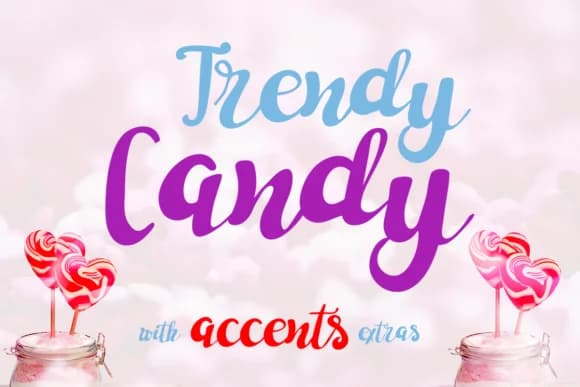
1 / 4About Trendy Candy Font
Trendy Candy Font by Lickable Pixels is a playful handwritten script that brings spontaneous energy and movement to informal design work. With its casual letterforms and dynamic baseline variations, this typeface excels at capturing the organic, hand-drawn quality that modern audiences find compelling and authentic. The design balances legibility with character, making it well-suited for projects where professionalism takes a backseat to personality and warmth.
This font proves particularly valuable for crafting custom greeting cards with genuine personality, designing personalized mugs and drinkware for small-batch sellers, and building festive birthday invitation suites that feel individually tailored. Etsy sellers regularly deploy Trendy Candy on product labels where the handwritten aesthetic justifies premium pricing and stands apart in crowded marketplaces. The typeface translates equally well to hand-painted signage and DIY craft applications, where its loose, approachable letterforms resonate with consumers seeking brands that feel made with care rather than mass-produced. Featuring a robust character set, the font handles various accents and special characters, ensuring consistency across diverse creative applications.
Find Trendy Candy Font on Creative Fabrica and bring this signature typeface into your design toolkit.
Style & Use Cases
- Overall Style
- Elegant, Flowing, Trendy Candy
- Use Case
- Invitations, Branding
- Ideal For
- wedding stationery, greeting cards, and signatures
- Pairs With
- a simple uppercase sans
How to Install Trendy Candy Font Font
Step-by-step instructions for every platform
- 1Download the Trendy Candy Font font file (.ttf or .otf).
- 2Locate the downloaded file in your Downloads folder.
- 3Right-click the font file.
- 4Select "Install" to install for the current user, or "Install for all users" to make it available system-wide.
- 5Trendy Candy Font is now available in Word, Photoshop, Illustrator, and all other apps.
More by Lickable Pixels
View all →
Browse fonts by theme
Curated collections →Saw a font in a picture? Identify any font from an image with our free Font Finder.
More Script Handwritten Fonts
Browse all →







What pairs well with Trendy Candy Font?
Trendy Candy Font is a script font that shines as a display or heading face. Pair it with a clean sans-serif or serif font for body text — the contrast creates a clear hierarchy while the two styles stay balanced and easy to read.



Trendy Candy Font
Reviewed by the FontBoxDL team · Updated May 2026