 Firefox
 1 / 6
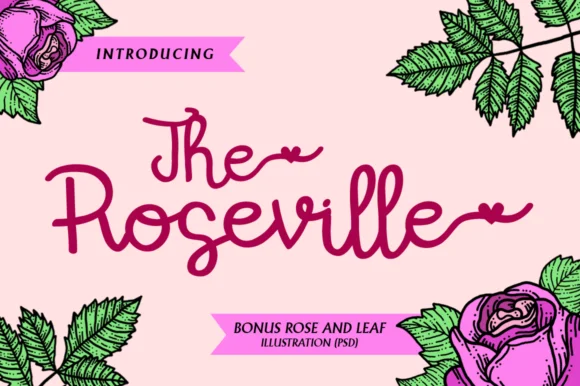
1 / 6About The Roseville Font
You're designing a wedding invitation suite and searching for lettering that feels genuinely handwritten, not mass-produced. The Roseville Font, created by illushvara, is exactly what you reach for in these moments. This handwritten script draws inspiration from the organic, flowing curves of roses, with enough personality and movement to make any layout feel intentional and distinctly human rather than algorithmic.
The Roseville finds its natural rhythm across wedding stationery and save-the-date cards, botanical product labels for small skincare and home beauty brands, hand-lettered social media graphics where personality matters, and custom greeting card designs. The spirited quality in every stroke gives it genuine visual interest without ever reading as chaotic or difficult to parse. You get authentic handmade warmth while keeping letterforms consistent enough to work at various sizes, which is the hardest balance to strike in any script font.
What makes this work in practice is the consistency underneath the playfulness. The Roseville handles both headers and body text depending on spacing and scale, so you're not locked into one specific application. Grab it from Creative Fabrica when you need a script that actually feels like it was written by hand rather than generated by algorithm.
Style & Use Cases
- Overall Style
- Elegant, Flowing, The Roseville
- Use Case
- Invitations, Branding
- Ideal For
- wedding stationery, greeting cards, and signatures
- Pairs With
- a simple uppercase sans
How to Install The Roseville Font Font
Step-by-step instructions for every platform
- 1Download the The Roseville Font font file (.ttf or .otf).
- 2Locate the downloaded file in your Downloads folder.
- 3Right-click the font file.
- 4Select "Install" to install for the current user, or "Install for all users" to make it available system-wide.
- 5The Roseville Font is now available in Word, Photoshop, Illustrator, and all other apps.
More by illushvara
View all →
Browse fonts by theme
Curated collections →Saw a font in a picture? Identify any font from an image with our free Font Finder.
More Script Handwritten Fonts
Browse all →







What pairs well with The Roseville Font?
The Roseville Font is a script font that shines as a display or heading face. Pair it with a clean sans-serif or serif font for body text — the contrast creates a clear hierarchy while the two styles stay balanced and easy to read.




The Roseville Font
by illushvara
Reviewed by the FontBoxDL team · Updated August 2026