 Firefox
 1 / 3
1 / 3About The Ampersand Story Font
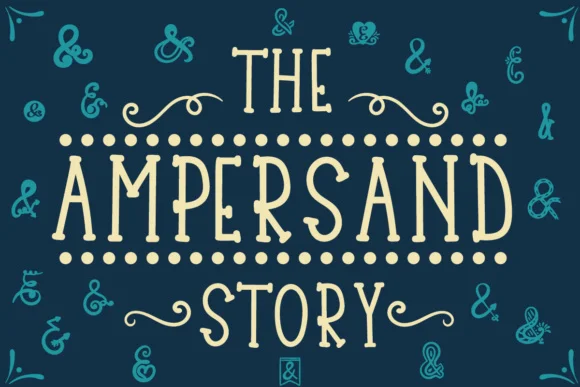
The Ampersand Story Font by Lickable Pixels is a hand-lettered script that celebrates the artistic potential of the ampersand symbol through an extensive collection of hand-drawn variations. Rather than functioning as a traditional complete alphabet, this font shines brightest when you need decorative ampersands for layered designs and ornamental compositions. The multiple unique glyph variations allow designers to select and layer different ampersand styles, adding visual sophistication and character to any creative work.
This specialty font excels in branding projects for luxury boutiques, custom wedding invitation suites, and upscale product packaging where the ampersand becomes a design statement in its own right. Decorative labels for artisanal goods, restaurant menu designs with ornamental headers, and monogrammed home décor pieces all benefit from the careful hand-drawn aesthetic of these symbols. The varied glyph set means you can incorporate different ampersand styles throughout a single project, creating visual interest while maintaining cohesive design language.
Whether you're crafting personalized stationery for clients, designing sophisticated social media graphics for high-end brands, or adding ornamental flourishes to premium print materials, The Ampersand Story Font offers the distinctive character that sets professional creative work apart. Get this unique font on Creative Fabrica and start layering hand-drawn ampersands into your most elegant and personalized designs.
Style & Use Cases
- Overall Style
- Elegant, Flowing, The Ampersand Story
- Use Case
- Invitations, Branding
- Ideal For
- wedding stationery, greeting cards, and signatures
- Pairs With
- a simple uppercase sans
How to Install The Ampersand Story Font Font
Step-by-step instructions for every platform
- 1Download the The Ampersand Story Font font file (.ttf or .otf).
- 2Locate the downloaded file in your Downloads folder.
- 3Right-click the font file.
- 4Select "Install" to install for the current user, or "Install for all users" to make it available system-wide.
- 5The Ampersand Story Font is now available in Word, Photoshop, Illustrator, and all other apps.
More by Lickable Pixels
View all →

Browse fonts by theme
Curated collections →Saw a font in a picture? Identify any font from an image with our free Font Finder.
More Script Handwritten Fonts
Browse all →







What pairs well with The Ampersand Story Font?
The Ampersand Story Font is a script font that shines as a display or heading face. Pair it with a clean sans-serif or serif font for body text — the contrast creates a clear hierarchy while the two styles stay balanced and easy to read.




The Ampersand Story Font
Reviewed by the FontBoxDL team · Updated May 2026