
 1 / 5
1 / 5About Teacher Divider Font
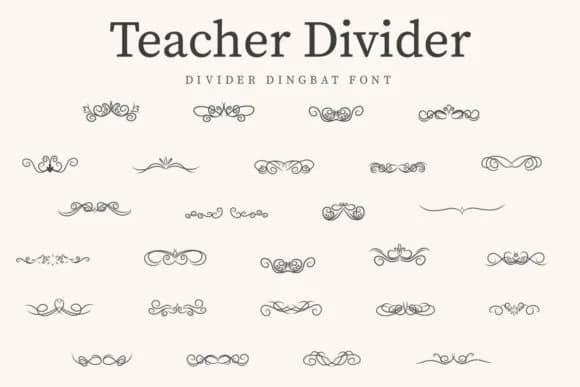
A playful approach to visual organization makes projects feel more intentional. Teacher Divider, created by CraftedType Studio, is a dingbat font built entirely of hand-drawn glyph illustrations that serve as dividers and decorative breaks. It's one of those fonts where every character has a job, making it especially valuable when you need to organize content visually without relying on text.
Consider how useful these glyphs become in a bullet journal spread where you want to separate sections without typing "Chapter 3." Layer them across t-shirt designs for teachers, whether it's a classroom appreciation tee or a fun school-themed graphic. The same glyphs work brilliantly in personalized planner layouts, scrapbooking pages, and greeting cards for educators or students. Many people also use divider fonts like this one to create sticker sheets for planners and journals, or to mark page breaks in lesson plan documents and learning materials. The flexibility of having decorative marks instead of text means you can scale and rotate without worrying about legibility.
This font pairs perfectly with a clean, minimal sans-serif for any accompanying text, which lets the decorative elements shine without visual clutter. Pick it up on Creative Fabrica and start adding structure to your designs.
Style & Use Cases
- Overall Style
- Iconographic, Teacher Divider
- Use Case
- Icons, Accents
- Ideal For
- ornaments, bullets, and decorative flourishes
- Pairs With
- any text font
How to Install Teacher Divider Font
Step-by-step instructions for every platform
- 1Download the Teacher Divider font file (.ttf or .otf).
- 2Locate the downloaded file in your Downloads folder.
- 3Right-click the font file.
- 4Select "Install" to install for the current user, or "Install for all users" to make it available system-wide.
- 5Teacher Divider is now available in Word, Photoshop, Illustrator, and all other apps.
More by CraftedType Studio
View all →



Browse fonts by theme
Curated collections →Saw a font in a picture? Identify any font from an image with our free Font Finder.
More Dingbats Fonts
Browse all →







What pairs well with Teacher Divider Font?
Teacher Divider Font is a versatile dingbats font that works for both headings and body text. Pair it with a contrasting sans-serif or serif font to add visual interest and a clear distinction between titles and body copy.



Teacher Divider Font
Reviewed by the FontBoxDL team · Updated July 2026