 Firefox
 1 / 6
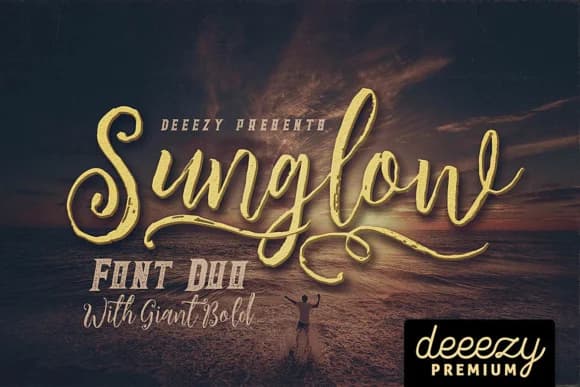
1 / 6About Sunglow Font
Sunglow by JumboDesign is a decorative handwritten script brimming with vintage charm and dynamic character, capturing the whimsical spirit of mid-century design movements and throwback aesthetics. The font features elegant swash alternates and intentional grunge texture variations that infuse personality into period-inspired projects while maintaining legibility across both print and digital applications.
This typeface excels at lending nostalgic appeal to artisanal branding identities, upscale packaging designs for boutique skincare and craft product labels, custom event invitations with authentic retro flair, and hand-lettered aesthetic designs for independent brands. When paired with the Giant Bold weight, the typeface family creates striking layered typographic compositions particularly effective for vintage poster designs, throwback merchandise graphics, heritage brand refresh campaigns, and retro-inspired social media content. The combination of multiple weights and swash styling options provides substantial flexibility across different design contexts, whether you're designing delicate display typography or bold headers that command immediate attention.
Sunglow's range of textural options and decorative variations makes it a versatile choice for designers seeking genuine vintage character without sacrificing modern technical functionality. Discover how Sunglow can enhance your retro design projects on Creative Fabrica.
Style & Use Cases
- Overall Style
- Elegant, Flowing, Sunglow
- Use Case
- Invitations, Branding
- Ideal For
- wedding stationery, greeting cards, and signatures
- Pairs With
- a simple uppercase sans
How to Install Sunglow Font Font
Step-by-step instructions for every platform
- 1Download the Sunglow Font font file (.ttf or .otf).
- 2Locate the downloaded file in your Downloads folder.
- 3Right-click the font file.
- 4Select "Install" to install for the current user, or "Install for all users" to make it available system-wide.
- 5Sunglow Font is now available in Word, Photoshop, Illustrator, and all other apps.
More by JumboDesign
View all →

Browse fonts by theme
Curated collections →Saw a font in a picture? Identify any font from an image with our free Font Finder.
More Script Handwritten Fonts
Browse all →







What pairs well with Sunglow Font?
Sunglow Font is a script font that shines as a display or heading face. Pair it with a clean sans-serif or serif font for body text — the contrast creates a clear hierarchy while the two styles stay balanced and easy to read.



Sunglow Font
by JumboDesign
Reviewed by the FontBoxDL team · Updated May 2026